If your business still relies on traditional landlines, time is short. The government says all PSTN-reliant devices, including every UK landline, need to be fully upgraded by January 2027. For many small businesses the replacement comes down to two options: Microsoft Teams Phone, which adds business calling to the Teams app your staff may already use, or a dedicated hosted VoIP service, where one provider supplies your numbers, call handling, apps and desk phones as a single service.
This guide compares the two on licensing, connection to the phone network, numbers and porting, emergency calls, broadband and support. Microsoft prices are its UK list prices on 27 October 2026, per user per month, excluding VAT. They are indicative, not what any particular reseller charges.
Replacing your phone lines before 2027?
Get a free, no-obligation quote for a hosted business phone system, including number porting.
The short answer
- Teams Phone suits businesses whose staff already work in Teams all day and mostly take calls on a laptop or mobile app. It is an add-on licence on top of Microsoft 365, and you also need a route to the phone network.
- Hosted VoIP suits businesses that want a complete phone service, with numbers, desk phones and call handling supplied and supported by one provider, whether or not staff use Teams.
- Both run over your internet connection, so both need a plan for broadband outages, power cuts and 999 calls.
Neither is automatically cheaper or better. The right choice depends on how your team takes calls and who will run the system.
What Teams Phone is and how it is licensed
Teams Phone adds cloud-based phone services to Teams so users can "make, receive, transfer, and transcribe calls", in Microsoft's words. It is licensed in layers:
- A Teams licence. Microsoft's UK Teams Phone page states that "a separate license for Microsoft Teams is required". For most small businesses that means a Microsoft 365 Business Basic, Standard or Premium plan with Teams, all of which Microsoft lists as eligible.
- A Teams Phone licence. Microsoft's licensing guidance says Teams Phone "requires a separate add-on license". Teams Phone Standard is £7.70 per user per month, paid yearly (Microsoft's UK list price, indicative).
- A connection to the public phone network. Without one, users can't make or receive external calls. Microsoft Calling Plans bundle this with the Teams Phone licence; the alternatives are in the next section.
It's easy to assume Business Premium includes Teams Phone. It doesn't: Microsoft's UK Premium page lists it under "additional services". Microsoft 365 E5 does include the phone system and Audio Conferencing, but Microsoft notes that "a domestic calling plan can be added to Teams Phone or added to Microsoft 365 E5", so E5 users still need a route to the phone network. Our comparison of Microsoft 365 Business plans covers what each plan does include.
Microsoft's UK page also lists Teams Phone bundled with a Microsoft Calling Plan, per user per month, paid yearly:
- Teams Phone with pay-as-you-go calling (country zone 1): £9.20 list price (indicative).
- Teams Phone with domestic calling: £13.10 list price (indicative), which Microsoft describes as a phone number with 3,000 outbound domestic calling minutes for the UK, US and Canada.
- Teams Phone with domestic and international calling: £26.10 list price (indicative), with 3,000 outbound domestic or 600 outbound international minutes.
As a worked example, one user on Business Standard with Teams (£10.80) plus Teams Phone with domestic calling (£13.10) comes to £23.90 per user per month before VAT and any desk phones (our calculation from Microsoft's UK list prices, indicative).
Connecting Teams to the phone network
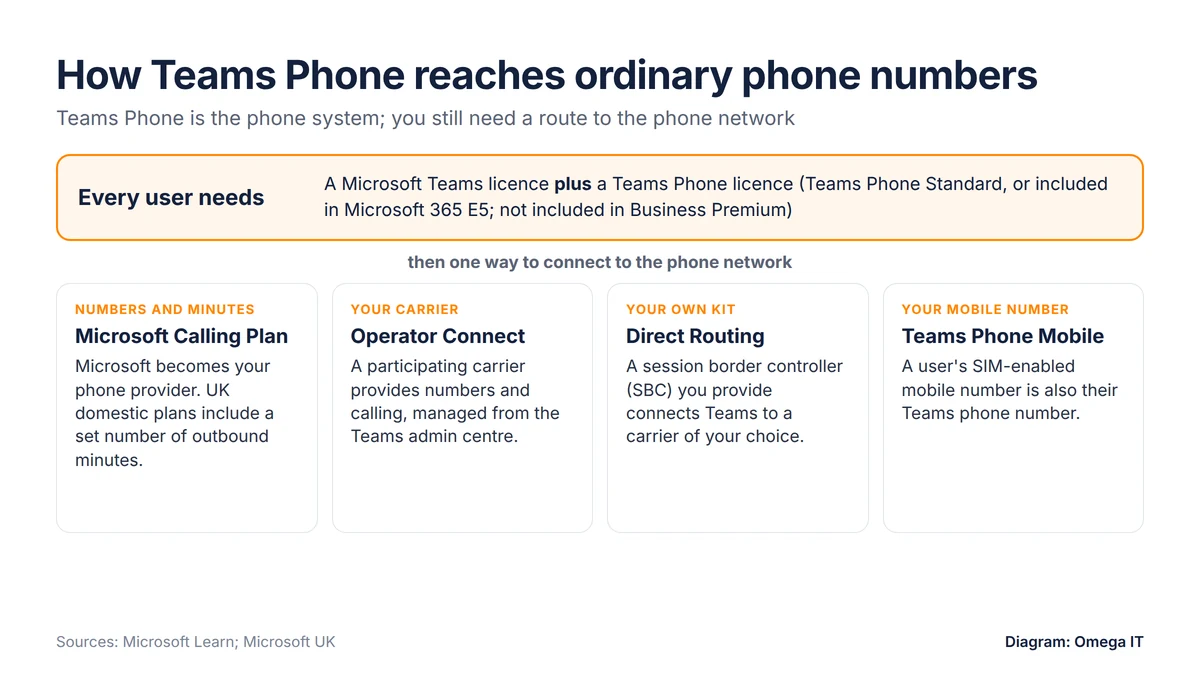
Teams Phone is the phone system, but it still needs a route to the public switched telephone network (PSTN). Microsoft's PSTN connectivity options are:
- Microsoft Calling Plans. You choose Microsoft as your phone carrier, buying numbers and minutes alongside your licences.
- Operator Connect. If your existing carrier takes part in Microsoft's Operator Connect programme, it can manage PSTN calling for you. Each user still needs a Teams Phone licence.
- Direct Routing. You connect a supported session border controller (SBC), which you provide, to Teams Phone. The SBC is yours to supply and run, or to have a partner run for you.
- Teams Phone Mobile. A user's SIM-enabled mobile number is also their Teams phone number. Check whether your mobile network offers it.
- Shared Calling. Users share the number of a resource account attached to an auto attendant for inbound and outbound calls, instead of each having their own number.
The route matters as much as the licence. It decides who your phone provider is, how your numbers are ported, how emergency calls are handled and who you call when a line stops working.
Teams Phone or hosted VoIP?
Tell us how your team takes calls and we'll quote a phone system that fits.
What hosted VoIP gives you instead
A hosted VoIP (voice over internet protocol) service is a business phone system that runs in the provider's cloud and reaches you over your internet connection. Instead of assembling a Teams licence, a phone licence, a carrier and handsets, you buy one service. The provider supplies your numbers, the call-handling features, desktop and mobile apps, and desk phones if you want them, and supports the whole thing.
Both approaches can offer the call handling most businesses rely on, such as hunt groups that pass calls around a team, auto attendants ("press 1 for sales") and call queues. How each is set up and licensed differs, so don't choose on a feature list: check that whatever you're quoted handles the call flows you actually use, from reception to out-of-hours.
A hosted phone system doesn't depend on Microsoft 365. That suits businesses on a no-Teams plan, teams that use other collaboration tools, and offices where reception and sales staff need dedicated handsets and call queues more than a Teams app. If you're still deciding whether to keep an on-site phone system at all, our guide to cloud phone systems vs traditional PBX covers that choice.
Teams Phone vs hosted VoIP side by side
| What to compare | Teams Phone | Hosted VoIP |
|---|---|---|
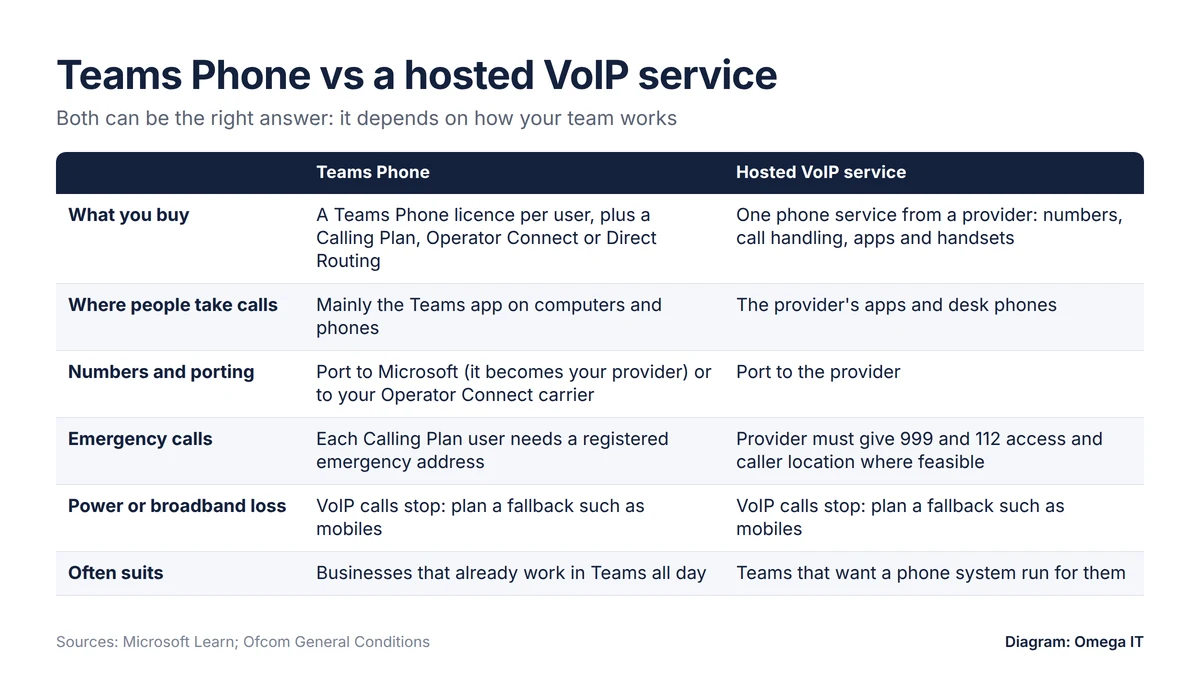
| What you buy | A Teams licence, a Teams Phone licence and a route to the phone network for each user | One phone service: numbers, calls, apps and handsets from one provider |
| Phone numbers | From Microsoft (Calling Plans) or a carrier (Operator Connect, Direct Routing) | From the hosted VoIP provider |
| Porting existing numbers | Into Microsoft, which then becomes your provider, or to your chosen carrier | To the hosted VoIP provider as part of the move |
| Desk phones and apps | The Teams app on computers and phones; check which desk phones are supported | The provider's apps, plus desk phones if you want them |
| Emergency calls | Registered emergency address needed for Calling Plan users | Ask how caller location and power-cut back-up work |
| Who supports it | Whoever runs your Microsoft 365, plus Microsoft or your carrier for the phone service | The hosted VoIP provider |
Numbers, porting and the 2027 deadline
Both routes let you keep existing numbers by porting them, but you end up with a different provider. If you import numbers into Microsoft Calling Plans, Microsoft says it "will become your service provider". With Operator Connect or Direct Routing, your phone service comes from a carrier rather than Microsoft. With hosted VoIP, the numbers move to the phone provider.
Whichever you choose, don't leave it late. The government says over two-thirds of UK landlines have already been upgraded to VoIP, and all PSTN-reliant devices need upgrading by January 2027. That deadline covers more than phones: alarms, payment terminals, lifts and intercoms can rely on analogue lines too, and replacing your phone system doesn't fix them. Before you port, list every number and line you have and what each one is used for.
Our PSTN switch-off guide explains what to check across the business, and our step-by-step guide to moving your business phones to hosted VoIP covers call flows, porting and go-live.
Move to modern phones
We'll plan your move to hosted voice, including number porting.
999 calls and power cuts
Emergency calling needs planning with any internet-based phone system, whichever option you choose.
With Microsoft Calling Plans, each user is automatically enabled for emergency calling and must have a registered emergency address linked to their number. In the UK, Microsoft says all outbound emergency calls "are first screened to determine the current location of the user" before being passed to the local public safety answering point (PSAP), the emergency call centre. Microsoft describes dynamic emergency location for Calling Plans in the US and Canada, not the UK, so keep registered addresses accurate, especially for people who work from home.
Ofcom's General Conditions put duties on phone providers. Calls to 999 and 112 must be free; providers must make accurate caller location information available as far as technically feasible; and they must tell consumers, small businesses and not-for-profits, in plain English, that emergency access over VoIP "may cease if there is a power cut or power failure, or a failure of the internet connection". Ofcom's power-cut guidance adds that providers should have at least one solution giving access to emergency services for at least one hour during a power cut at the premises.
So ask every provider you're comparing, Microsoft or otherwise, three questions: how caller location works for office and remote staff, what happens to 999 calls in a power cut or broadband outage, and what their power-cut solution is for anyone who would need it.
Broadband and call quality
Teams Phone and hosted VoIP both carry calls over your internet connection, so a phone system is only as dependable as the broadband underneath it. Before you switch:
- Test your connection at busy times of day, not just first thing; our free broadband speed test is a quick starting point.
- Check upload as well as download speed, because every call sends your voice out as well as bringing the other person's in.
- Check Wi-Fi in the places people actually take calls.
- Decide what happens if the office connection fails: whether people can switch to mobile apps, and whether calls can be diverted.
Our business broadband and leased lines guide compares full fibre, SoGEA and leased lines, including back-up connections.
Which suits your business
Teams Phone tends to fit when:
- staff already spend the day in Teams and are happy to take calls on a headset or mobile app;
- you're on a Microsoft 365 plan with Teams, or on E5, which includes the phone system;
- someone, in-house or an IT provider, already manages your Microsoft 365 and can take on phone administration, including emergency addresses.
Hosted VoIP tends to fit when:
- you want desk phones, reception handling and call queues supplied and supported as one service;
- not everyone uses Teams, or you're on a no-Teams Microsoft 365 plan;
- you'd rather have one phone provider responsible for numbers, service and handsets.
Whichever way you lean, compare like for like. Ask for prices based on the same number of users, the same call pattern and the same handsets, and include the Teams licence in the Teams Phone figure, since Teams Phone can't work without it.
How Omega IT can help
Omega IT offers a hosted business phone system, including number porting, alongside Microsoft 365 services. If you're replacing your landlines before January 2027, get a free, no-obligation quote based on how your team takes calls.
Sources
- Microsoft: Microsoft Teams Phone (UK) (accessed 27 October 2026)
- Microsoft: Microsoft 365 Business Premium (UK) (accessed 27 October 2026)
- Microsoft: Microsoft 365 Business Standard (UK) (accessed 27 October 2026)
- Microsoft Learn: Microsoft Teams add-on licensing
- Microsoft Learn: PSTN connectivity options
- Microsoft Learn: Emergency calling considerations for Calling Plans
- Ofcom: General Conditions of Entitlement, unofficial consolidated version (1 October 2024)
- Ofcom: Guidance on protecting access to emergency organisations during power cuts
- GOV.UK: Moving landlines to digital technologies
General guidance, accurate to October 2026. Prices change; any prices shown are indicative. Diagrams by Omega IT.