An eSIM does the same job as the plastic SIM card in a phone, but it is built into the handset and downloaded over the air. For a business that means no cards to post, store or lose, and quicker set-up for new starters. It also raises new questions: which phones need it, what each network allows, and how to stop a fraudster moving your number to an eSIM they control.
This guide covers what eSIM changes for a UK business fleet in late 2026, from setting up eSIMs through device management to keeping your numbers when you switch network.
Moving your team to eSIM?
Get a free, no-obligation business mobile quote on EE, O2, Vodafone or Three.
What an eSIM is
An eSIM (embedded SIM) is a chip built into the phone. Instead of sending a card, the network creates a digital SIM profile on its provisioning server and the phone downloads it. Apple calls that server the SM-DP+ server, and some device management tools ask for its address.
Converting a line to eSIM does not change the number, tariff or contract. Two practical differences matter:
- One phone, several lines. Many current phones can run two lines at once. Apple says iPhone Air supports two active eSIMs and can store eight or more.
- Profiles cannot be copied. Apple notes that the GSMA's eSIM specification SGP.21 "restricts eSIM profiles from being exported", so a replacement phone needs a new profile or a transfer.
Which business phones use eSIM in the UK
Most phones sold in the UK support both a physical nano-SIM and eSIM, but the exceptions run in both directions, so check every model in your fleet.
| Phone (UK models) | SIM options | What it means for a fleet |
|---|---|---|
| iPhone Air, iPhone Duo | eSIM only, no SIM tray | Every line must be an eSIM |
| iPhone 16, 17, 17e, 18 Pro, 18 Pro Max | Nano-SIM and eSIM | Either works |
| Galaxy S26 series, S26 FE, A57, A37 | Two SIMs, SIM plus eSIM, or dual eSIM | Flexible, including two eSIM lines |
| Galaxy Z Fold8, Z Flip8 | One SIM plus eSIM, or dual eSIM | No second physical SIM slot |
| Galaxy A27, A17 | One SIM plus a hybrid SIM or microSD slot; no eSIM | Physical SIMs only |
| Pixel 10 and 11 ranges, Pixel 10a | One nano-SIM and eSIM | Either works |
One trap: Apple's SIM-type article lists the iPhone 17, 17e, 17 Pro and 18 Pro families as eSIM-only when bought in the United States, Canada, Japan and several other countries. UK models keep the tray, but an imported handset may not. Rugged phones vary too: the Galaxy XCover7 Pro and Crosscall CORE-M6 take a physical SIM plus eSIM, while the Crosscall CORE-Z5 lists nano-SIM only. Our guide to the best business mobile phones for 2026 covers the wider choice.
What the UK networks offer business customers
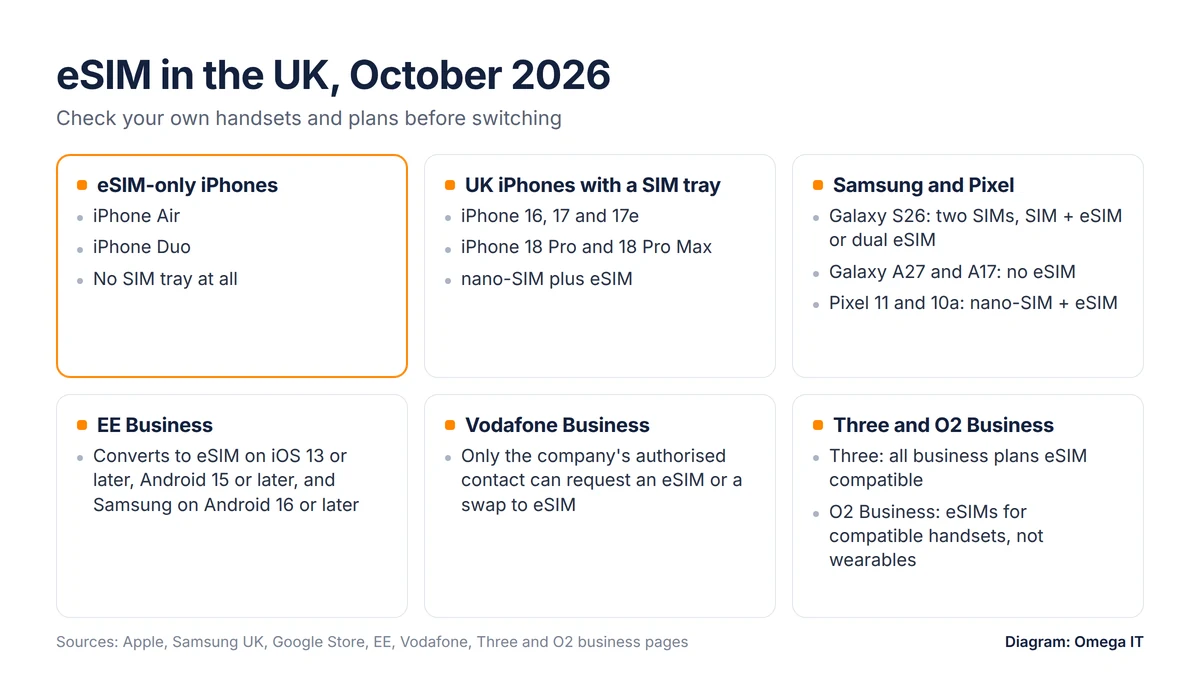
All four networks describe eSIM support for business customers, but with different rules:
- EE Business supports converting to eSIM on iPhones running iOS 13 and above, Android phones on Android 15 and above, and Samsung phones on Android 16 and above, according to its eSIM help page.
- Vodafone Business says "a new eSIM or a SIM swap to eSIM can only be requested by the company's authorised contact". Corporate customers can order eSIMs online using a QR code or the device's EID (the identifier of its eSIM chip), and smartwatch eSIMs are offered only to teams of one to nine.
- Three Business states that "All our plans are eSIM compatible". It sends the QR code by email or voucher and says an eSIM can be deactivated remotely.
- O2 Business (formerly O2 Daisy) says, in its own words: "We are currently only able to offer eSIMs for compatible mobile handsets on the O2 and Vodafone networks. We can't support eSIMs for wearables". It provides eSIMs at no extra charge.
For iPhones, Apple's carrier list shows 3, EE, O2, Sky Mobile, Tesco Mobile and Vodafone supporting eSIM carrier activation in the UK, and all except Tesco Mobile supporting eSIM Quick Transfer. If you buy through a reseller, ask which routes it can use. For the wider buying process, see how to choose a business mobile provider.
Plans that suit your handsets
Tell us which phones your team uses and we'll quote SIM-only or handset plans to match.
How activation and transfer work
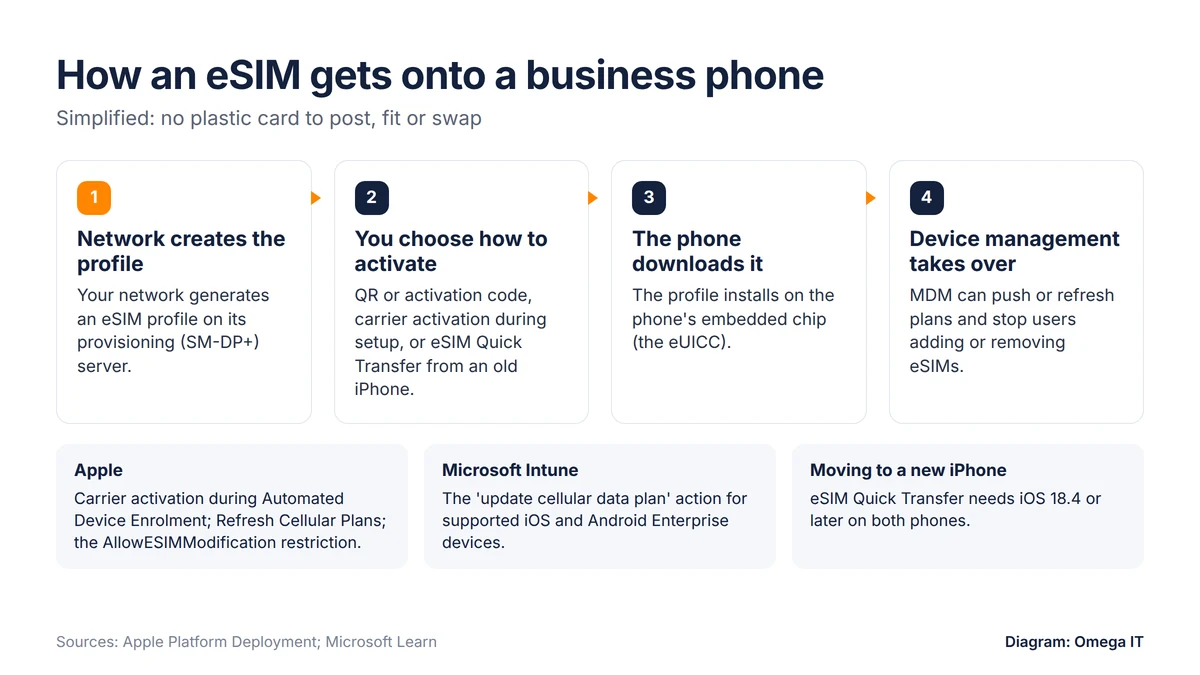
There are three common ways to get an eSIM onto a phone:
- QR code or activation code. The network sends a code, the user scans it and the profile downloads. Treat codes like SIM cards and send them only to the person who needs them.
- Carrier activation. The network links an eSIM to the phone in advance. Apple says that if your provider supports eSIM Network Provider Activation, eSIMs can install automatically on iPhones (iOS 16 or later) set up through Automated Device Enrolment.
- eSIM Quick Transfer. A user moves a number from an old iPhone to a new one. Apple says both must be on iOS 18.4 or later, with Bluetooth on, the same Apple Account and the old phone unlocked. From iOS 26, more than one number can be moved.
Quick Transfer suits a like-for-like upgrade by the same person. For company phones set up centrally or passed between staff, carrier activation or a network-issued code keeps the business in control.
Managing eSIMs across a fleet
Beyond a handful of phones, manage eSIMs through mobile device management (MDM) rather than one phone at a time:
- Apple Business. Apple's free platform replaced Apple Business Manager in April 2026 and includes built-in device management. With carrier activation, a new iPhone can install its eSIM automatically during set-up. Zero-touch deployment needs phones bought through Apple or an Apple Authorised Reseller.
- Pushing plans. Apple's Refresh Cellular Plans command gives a managed iPhone the address of the network's eSIM server so it can fetch its plan.
- Locking changes. Apple's AllowESIMModification restriction prevents users adding or removing eSIMs.
- Microsoft Intune. The update cellular data plan action can remotely activate an eSIM plan on supported iPhones and iPads, and activate or remove eSIMs on supported Android Enterprise devices. Microsoft has labelled it a preview, so check its status for your platform.
Whichever tool you use, keep a register of each phone, its user, its number and its EID. It makes swaps, leavers and lost phones much quicker to handle. Our Microsoft Intune guide explains how device management fits together.
Switching networks and keeping your numbers
Moving to eSIM does not replace number porting. To take a number to a new network you still need a PAC (porting authorisation code); a STAC ends a line without keeping the number. Business lines follow slightly different rules from consumer ones:
- One number: you can text "PAC" to 65075. Under Ofcom's switching condition C7, a business tariff provider has up to two working days to reply by text; asked by phone, it should give the code during the call or by text within two hours.
- Two to 24 numbers: request PACs online or by phone, not by text.
- More than 24 numbers: contact your current provider, which will tell you what to do.
A PAC is valid for 30 days, and Ofcom's switching guide says the new provider must complete the switch within one working day. With eSIM, the new network sends a profile by QR code or carrier activation instead of a card, so plan for each user to have it ready on the day their number moves.
Find the right plan
We'll match handsets, data and device management to your team.
eSIM and SIM-swap fraud
SIM-swap fraud is when a criminal persuades a network to move your number to a SIM or eSIM they control, so they receive your calls and texts, including security codes sent by SMS. Cifas recorded nearly 3,000 unauthorised SIM swaps in 2024, an increase of 1,055%, and found 48% of account takeover cases that year involved mobile phone accounts. It has since reported unauthorised SIM swaps up 38% in 2025 and a 402% uplift in the first six months of 2026.
eSIM does not change your exposure on its own: Which? notes it "depends on the security checks set up by your mobile network, regardless of whether you have a physical or virtual Sim". But Merseyside Police warns that "eSIMs can be activated remotely without physical access". The controls sit with your account and your sign-ins:
- Add an account PIN or passcode required for any SIM change, as the GSMA advises.
- Limit who can request changes to a few named authorised contacts on the account.
- Stop relying on SMS codes. Move staff to authenticator apps; our MFA guide for small businesses explains how. The Cyber Essentials requirements note SMS "is not the most secure type of MFA", though it beats having none.
- Act fast on a dead phone. If a work phone suddenly loses all service, ring the network from another phone and ask whether a SIM change has been made.
If you suspect fraud, contact the network, secure the accounts linked to that number and report it to Report Fraud, which replaced Action Fraud on 4 December 2025. Our lost or stolen business mobile guide covers barring, wiping and securing accounts.
Travel, dual SIM and IoT
Dual SIM. One handset can carry a work and a personal number, or a UK line plus a travel data plan. If you add a work line to a staff member's own phone, note that Cyber Essentials treats personal phones used only for calls, texts and MFA apps as out of scope, but brings them into scope once they access company email, files or other organisational services.
Travel eSIMs. Apple's UK carrier list includes eSIM providers such as BetterRoaming and Ubigi as well as the networks. Check the business plan first: O2 Business includes Europe roaming in UK allowances unless the contract states otherwise, while EE, Vodafone and Three charge a daily fee on many plans but include Europe on some plan families. If you lock eSIM changes, agree how staff request a travel eSIM before they reach the airport.
IoT. The GSMA's SGP.32 specification (version 1.3, May 2026) covers remote provisioning and management of eSIMs in connected devices with limited connectivity or no real user interface, so a business can manage profiles across trackers, sensors or terminals remotely. Ask suppliers whether their kit supports it, and which network technology it relies on: the UK's 2G networks switch off between 2029 and 2033, as our UK mobile network comparison explains.
Is it time to move your fleet to eSIM?
Unless you are buying eSIM-only iPhones, you can move at your own pace. A sensible order:
- Audit your handsets. iPhone Air and Duo force the issue; Galaxy A27 and A17 rule eSIM out.
- Check your network's rules: who can request an eSIM, how codes arrive and whether wearables are supported.
- Lock down the account with a PIN and named authorised contacts.
- Choose your method: carrier activation through device management for new phones, codes or Quick Transfer for existing ones.
- Move on refresh. Switch each user to eSIM when their phone is replaced, so there are no spare SIM cards to keep in a drawer.
How Omega IT can help
Omega IT offers business mobile and device management, and quotes business mobile on EE, O2, Vodafone and Three, with SIM-only and handset plans quoted against your business's real usage. It also offers cyber security services and is Cyber Essentials Plus certified. Find out more about business mobile and device management, or ask for a free, no-obligation quote.
Sources
- Apple: iPhone models with eSIM only or eSIM and nano-SIM (25 October 2026)
- Apple: Buy iPhone Air (UK store)
- Apple: Wireless carriers that support eSIM (1 July 2026)
- Apple: eSIM Quick Transfer
- Apple Platform Deployment: Prepare to use eSIMs (24 September 2025)
- Apple Platform Deployment: Use a device management service to deploy devices with cellular connections
- Apple Newsroom: Introducing Apple Business (24 March 2026)
- Microsoft Learn: Update cellular data plan
- Samsung UK: Galaxy S26 Ultra specifications
- Samsung UK: Galaxy A27 5G specifications
- Samsung UK: Galaxy Z Fold8 specifications
- Samsung UK: Galaxy XCover7 Pro specifications
- Google Store UK: Pixel 11 tech specs
- Crosscall: CORE-M6 and CORE-Z5 product pages
- EE Business: Convert your SIM to an eSIM
- Vodafone Business: Business eSIM
- Three Business: eSIM plans
- O2 Business: eSIM cards (11 September 2026); Going abroad in Europe
- Ofcom: Switching mobile phone provider (updated 25 August 2026)
- Ofcom: Switching: mobile (3 April 2023)
- Ofcom: General Condition C7: switching (unofficial consolidated extract)
- Cifas: Huge surge in SIM swaps hits telco and mobile (7 May 2025); Fraudscape 2026 (12 March 2026); Fraudscape 2026 six-month update (4 August 2026)
- Which?: SIM-swap fraud doubles year on year (9 January 2025)
- Merseyside Police: SIM swapping fraud warning issued (1 September 2025)
- GSMA: Scam advice: fraudulent SIM swap
- GSMA: eSIM specifications (SGP.32 v1.3, 22 May 2026)
- GOV.UK: Report Fraud: new service from City of London Police (4 December 2025)
- NCSC: Cyber Essentials Requirements for IT Infrastructure v3.3 (April 2026)
General guidance, accurate to October 2026. Diagrams by Omega IT.