For years, password advice was a juggling act: make every password long and unique, then somehow remember them all. In April 2026 the National Cyber Security Centre (NCSC) changed its position. It now says passkeys should be the first choice of login wherever a service offers them, and that where it doesn't, people should use a password manager and keep two-step verification (2SV) switched on.
This guide explains what passkeys and password managers are, what to look for in a business password manager, what Cyber Essentials now requires, and how to roll both out across a small business without locking anyone out.
Moving your team to passkeys?
Talk to Omega IT about rolling out passkeys and a business password manager.
What changed in 2026
- April 2026: the NCSC's small organisations guide now tells businesses that "where passkeys are available, you should enable them for business-critical accounts as a priority", and to protect other accounts with a strong password and 2SV.
- 23 April 2026: at its CYBERUK conference in Glasgow, the NCSC said passkeys should be consumers' first choice of login and that they are "at least as secure as, and generally more secure than" the strongest password with 2SV. It also recommended passkeys to businesses as the default login to offer their customers.
- 27 April 2026: version 3.3 of the Cyber Essentials requirements took effect, used with IASME's "Danzell" question set. It makes MFA on cloud services a pass-or-fail item and updates the definition of passwordless authentication to include FIDO2, the standard behind passkeys.
The NCSC says the shift "will be reflected through our ongoing refresh of guidance rather than as a single sudden change", so some older NCSC pages still read as password-first. The direction is clear, though.
Passkeys in plain English
A passkey replaces the password you type with a digital key held on your phone, computer, a physical security key or a password manager. When you sign in, you confirm it's you with your fingerprint, face or device PIN, and your device proves who you are to the genuine website. There is nothing to type, so there is nothing for a fake login page to capture.
Three points from the NCSC and Cyber Essentials matter for businesses:
- Passkeys resist phishing. The NCSC's passkeys blog says all traditional MFA methods, including SMS codes, email codes, authenticator app codes and push approvals, are "inherently phishable". Passkeys are its answer to that.
- They count as MFA. When the login requires user verification, such as a fingerprint or PIN, the NCSC says FIDO2 authentication "constitutes multi-factor authentication", and Cyber Essentials v3.3 regards FIDO2 authenticators as MFA.
- They can live in a password manager. The NCSC's passkeys explainer notes that a password manager is "more accurately called a 'credential manager'" because it manages more than passwords.
The catch is availability. Plenty of business systems still offer only passwords, which is why the NCSC's advice has a second half.
Why a password manager still matters
Until every service supports passkeys, staff will still have many passwords. The NCSC recommends password managers "for secure storage wherever appropriate", and its buyer's guide says that while they "aren't perfect... the benefits outweigh the risks". A password manager helps in three practical ways:
- Unique passwords everywhere. Staff don't have to remember them, so there's no reason to reuse one password across services.
- Some protection from phishing. The NCSC points out that a saved password "will only autofill on the correct website", so a lookalike site won't get it filled in. That matters for the scams in our guide to phishing and invoice fraud.
- Safer handling of shared logins. The NCSC doesn't recommend sharing passwords between people, but says enterprise password managers "can help mitigate some of the risks of sharing".
The NCSC is also clear that password managers "are not impregnable and are an attractive target for attackers", so the product and its settings matter. For the few passwords people must still remember, its "three random words" technique gives passphrases that are memorable but hard to guess, or you can use our free password generator.
Get sign-ins ready for Cyber Essentials
Get advice on MFA, password rules and passkeys for your cloud services.
What to look for in a business password manager
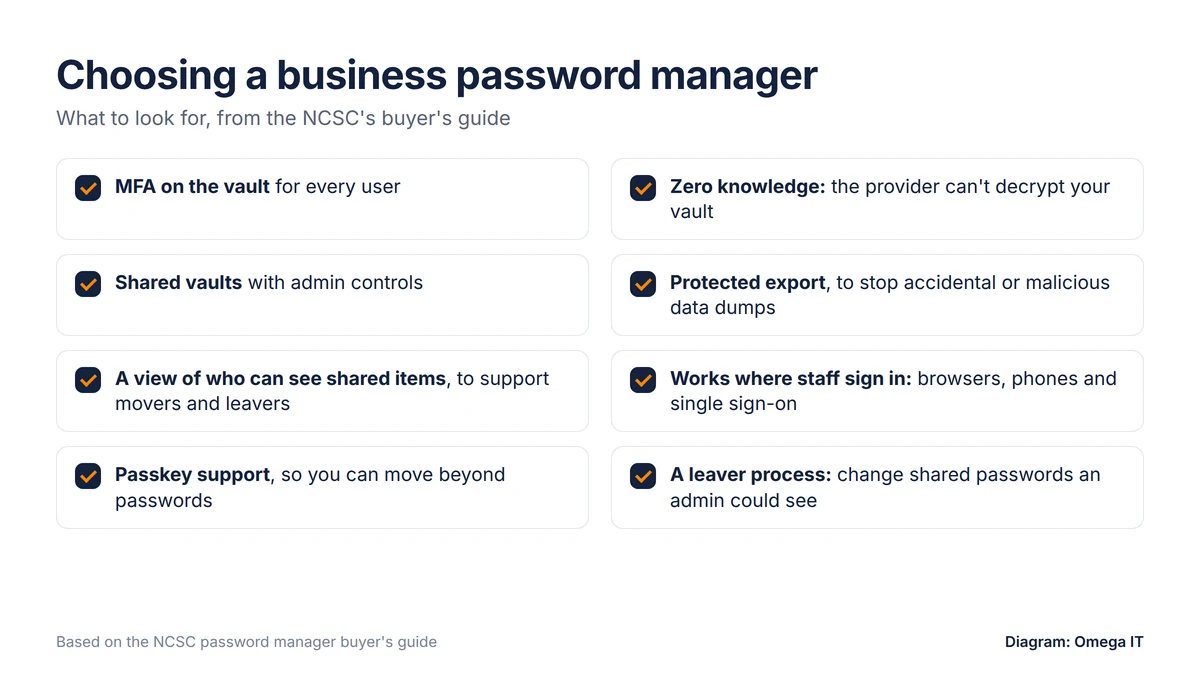
The NCSC's buyer's guide was last reviewed in 2018, but its principles still hold. We'd check any shortlisted product for:
- Multi-factor sign-in to the vault. The NCSC says MFA "should be used on all cloud-sync password managers", and wherever they hold administrator or other sensitive passwords.
- A provider that can't read your vault. "The decryption key should not be accessible to others, including the cloud service provider."
- Protected export. If passwords can be exported, that function "should be protected to avoid accidental or malicious export".
- Shared vaults with admin controls, so a team can share the logins it genuinely must, managed centrally rather than passed around by email or chat.
- Visibility for leavers. The NCSC suggests an "overview of which accounts are in a user's vault (including shared passwords)" to support the movers and leavers process.
- A fit with how you work: your browsers and phones, single sign-on if you use it, and passkey support, given the NCSC's new direction.
Sign-in methods ranked
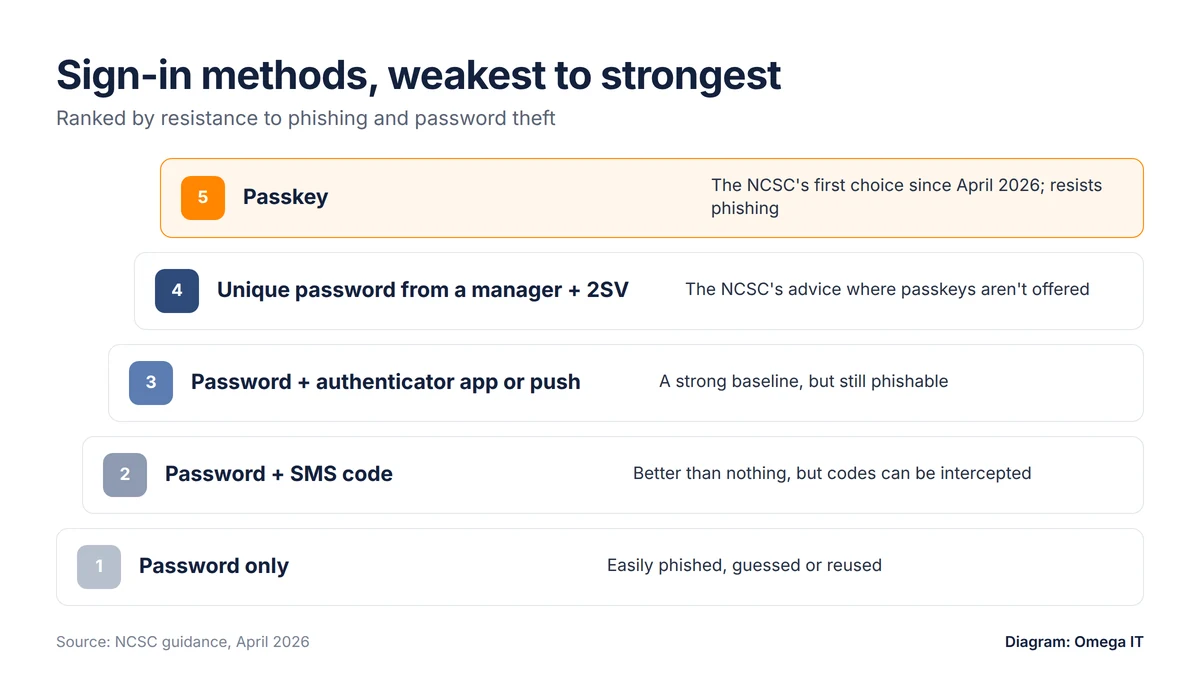
Putting the guidance together, from weakest to strongest:
- A password on its own. One phished or reused password and the account is lost.
- A password plus SMS codes. Cyber Essentials says SMS "is not the most secure type of MFA but still offers a huge advantage over not using any MFA at all".
- A password plus an authenticator app or push approval. No reliance on text messages, but a convincing fake site can still capture a code or trick someone into approving a prompt.
- A unique password from a password manager, with 2SV. The NCSC's fallback where passkeys aren't available: the password is unique, autofills only on the genuine site and has a second factor behind it.
- A passkey. The NCSC's first choice wherever it's available.
The practical rule: passkeys first for business-critical accounts, then a password manager and 2SV for everything else. Our MFA guide for small businesses covers second factors in more detail.
What Cyber Essentials now requires
Cyber Essentials v3.3 has applied since 27 April 2026. IASME gave organisations with an assessment account opened before the change six months to certify against the previous version, so that window closes around now (our calculation). The v3.3 requirements on sign-in are:
- MFA on every cloud service. "Authentication to cloud services must always use MFA." IASME says organisations that fail to implement it, "whether it is free, included, or a paid option", will automatically fail. The Danzell question set applies this to administrators and all users of cloud services.
- Password length. With MFA, the password must be at least 8 characters, with no maximum. Without MFA, it needs at least 12 characters, or at least 8 with automatic blocking of common passwords using a deny list.
- Brute-force protection. Use MFA, throttling (no more than 10 guesses in 5 minutes) or lockout after no more than 10 failed attempts.
- Support for users. Promote passwords of at least three words, provide secure storage such as a password manager, and don't enforce regular expiry or complexity rules.
- Passkeys count. FIDO2 authenticators are considered passkeys and regarded as MFA.
Our Cyber Essentials self-assessment guide covers the wider question set, and our free Cyber Essentials checklist is a quick way to spot gaps.
Want help putting this in place?
Omega IT can set up the protections this guide covers.
Rolling it out without the chaos
Password managers and passkeys sit alongside the other basics in our small-business cyber security checklist. A sensible order:
- Start with the accounts that matter most: administrator, email, finance, banking and payroll. Turn on passkeys where they're offered and put the rest in the password manager with MFA.
- Find out where passwords live now: browsers, spreadsheets, notebooks and shared documents. Move them into the vault and delete the old copies.
- Give people their own accounts. The Danzell question set is blunt: "Accounts must not be shared." Replace shared logins with individual ones wherever a service allows, and keep any that remain in a shared vault with controlled access.
- Use single sign-on where you can. The NCSC notes that signing in with your organisational account helps you control access to other services and revoke it "along with someone's work account when they leave".
- Plan for leavers from day one. When an administrator leaves or changes role, the NCSC says "all the passwords they can see (and use)" should be changed. Our IT starters, movers and leavers checklist covers the rest.
- Brief staff before you switch. Explain what's changing, how to set up the vault and passkeys, and who to ask for help. Keep a verified recovery process so a lost phone doesn't become a lockout.
Lessons from the LastPass breach
In December 2022, LastPass disclosed that an attacker had copied a backup of customer account information and a backup of customer vault data. The vault backup held some unencrypted data, such as website URLs, alongside encrypted fields including usernames, passwords and secure notes.
In December 2025 the ICO fined LastPass UK Ltd £1,228,283 under UK GDPR's security requirements. Its penalty notice, dated 20 November 2025, records that personal data of 1,631,410 UK-based customers was unlawfully accessed and exfiltrated. (The regulator became the Information Commission on 30 September 2026 and is still known as the ICO.) The ICO's account of how the attack worked is the useful part:
- a keylogger captured an employee's master password;
- MFA was bypassed using a trusted device cookie;
- the attacker then got into the employee's personal and business vaults, which were linked using a single master password.
The lessons for a small business: keep work and personal vaults separate; protect the devices people use to unlock vaults; be careful with "remember this device" settings on privileged accounts; and choose a provider that can't decrypt your vault. The ICO found "no evidence that hackers were able to unencrypt customer passwords", and says password managers "are a safe and effective tool" whose use it continues to encourage.
Microsoft 365 sign-ins and passkeys
For most small businesses, the Microsoft 365 account is the most important login of all: it holds email and files, and through single sign-on it can open other services too. Microsoft says security defaults, which turn on MFA, are on by default for new tenants, and Business Premium adds Microsoft Entra ID P1 with Conditional Access for policy-based control of sign-ins. Because Cyber Essentials treats FIDO2 authenticators as MFA, passkeys and security keys can meet the cloud MFA requirement and resist phishing at the same time.
Practical steps:
- check MFA is enforced for every user, not just administrators;
- give administrators separate accounts used only for admin work, as the NCSC and Cyber Essentials expect, and prioritise those accounts for passkeys or security keys where your set-up supports them;
- use Microsoft 365 single sign-on for other business apps that support it, so people hold fewer passwords;
- ask whoever manages your tenant which passkey and security key options are enabled.
Our comparison of Microsoft 365 Business Basic, Standard and Premium explains which plan includes Conditional Access.
How Omega IT can help
Omega IT is Cyber Essentials Plus certified and offers cyber security and Microsoft 365 services. If you're planning a move to passkeys or a business password manager, or getting sign-ins ready for Cyber Essentials, talk to our team. Quotes are free and no-obligation.
Sources
- NCSC: NCSC: leave passwords in the past, passkeys are the future (23 April 2026)
- NCSC: Passkeys are more secure than traditional ways to log in (23 April 2026)
- NCSC: Small organisations guide: secure your important online accounts (April 2026, reviewed 21 July 2026)
- NCSC: Passkeys
- NCSC: Password policy: updating your approach (reviewed 19 November 2018)
- NCSC: Password manager buyers guide (reviewed 19 November 2018)
- NCSC: Password managers (reviewed 21 May 2026)
- NCSC: Three random words or #thinkrandom (27 October 2016)
- NCSC: 10 Steps to Cyber Security: identity and access management (11 May 2021)
- NCSC: Cyber Essentials: Requirements for IT Infrastructure v3.3 (April 2026)
- IASME: Important update: changes to Cyber Essentials for April 2026 (12 February 2026)
- IASME: Cyber Essentials Danzell question set, version 16.3 (May 2026)
- LastPass: Notice of recent security incident (22 December 2022)
- ICO: Password manager provider fined (11 December 2025)
- ICO: Penalty notice: LastPass UK Ltd (20 November 2025)
- ICO: ICO governance changes confirmed for 30 September 2026
- Microsoft Learn: Microsoft 365 Business Premium security overview
General guidance, accurate to October 2026. Diagrams by Omega IT.