
When a UK business is hit by cyber crime, it is rarely a Hollywood-style hack. Far more often it starts with an email: a convincing message that tricks someone into handing over a password, or a quiet change to an invoice's bank details that sends a payment to a criminal. Phishing and invoice fraud are the everyday scams that cause the most harm, and the good news is that simple, low-cost controls stop most of them. This guide explains how they work and exactly what to put in place.
Could a fake invoice catch you?
See how our cyber security team helps businesses stop phishing and invoice fraud.
Why these two, and why now
The UK government's Cyber Security Breaches Survey 2025/26 found that phishing was by far the most common attack, hitting 38% of businesses, and the most disruptive. Attackers favour it because it targets people, not technology, and it scales: one convincing email can be sent to thousands of inboxes. Invoice fraud is the high-value cousin, where the goal is not a password but a payment.
How phishing works
Phishing is a message designed to make someone act against their own interest: click a link, open an attachment, or enter their password on a fake page. Modern phishing is well-written, often impersonates a brand or a colleague, and creates urgency ("your account will be suspended", "the director needs this now"). Once an attacker has a password, they can read email, hunt for payment information, and set up the next stage, which is frequently invoice fraud. Our article on the importance of cyber security sets the wider scene; here the focus is practical defence.
How invoice fraud (business email compromise) works
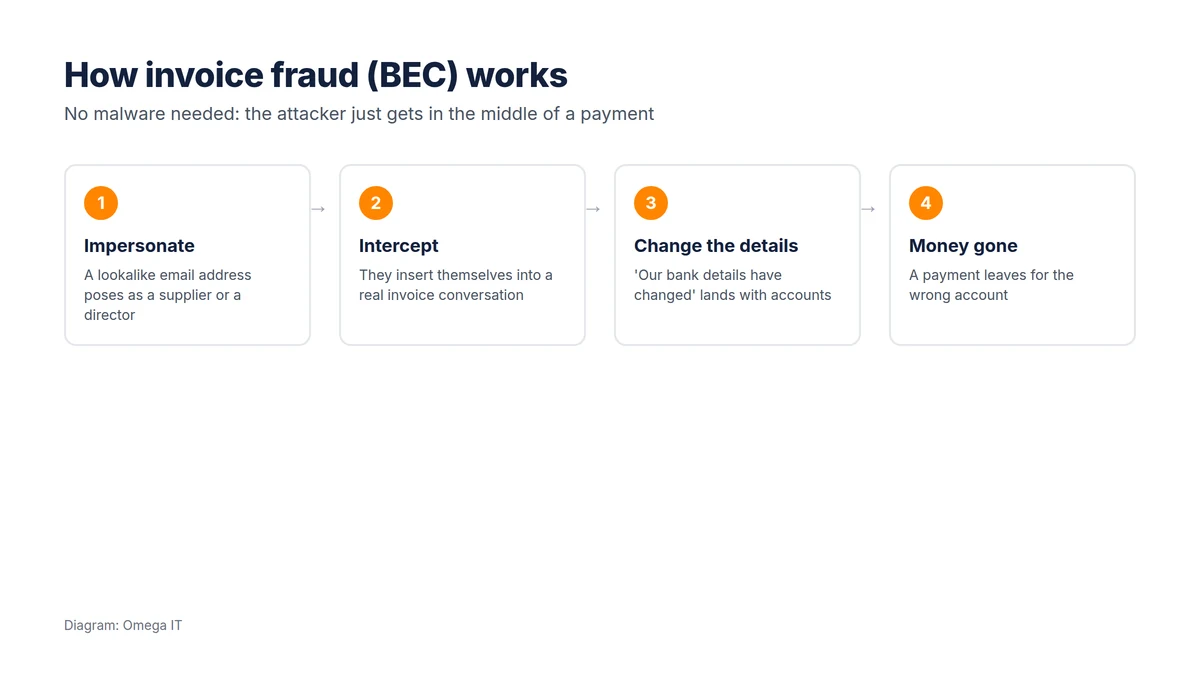
Invoice fraud, also called business email compromise (BEC), often involves no hacking at all. The attacker registers an email address that looks almost identical to a real one, a supplier's or a director's, and inserts themselves into a genuine payment conversation. They then send a message along the lines of "our bank details have changed, please use these from now on". The accounts team, seeing a familiar name and a real-looking invoice, pays, and the money goes to the criminal. It is frequently discovered only when the real supplier chases the missing payment weeks later.
Because there is no malware and no breached system, technology alone will not catch it. The defence is mostly about process.
Stop the scams that cost most
Our team can put the controls this article describes in place for you.
How to stop it
For invoice fraud (the money controls)
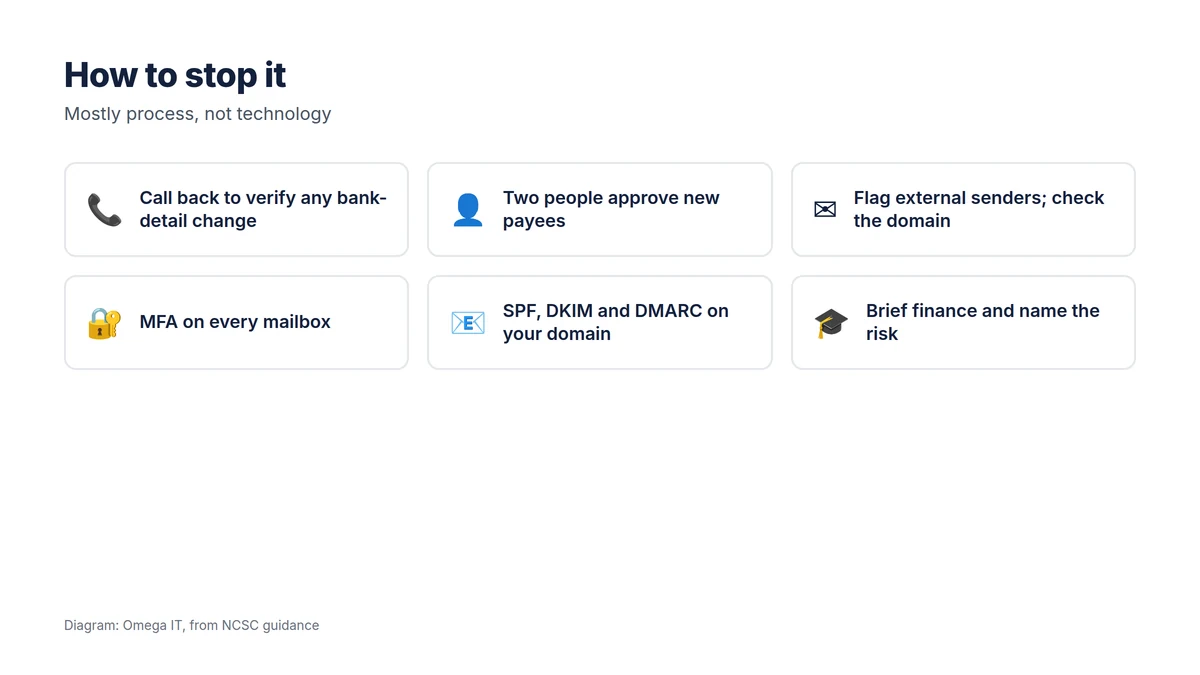
- Call back to verify. Any new or changed bank details are confirmed by phone, on a number you already hold, never one from the email, before a payment is made. This one rule stops most invoice fraud.
- Two people for new payees. One sets up or changes a payee, another approves it, especially for large or first-time payments.
- Agree it with suppliers. Tell key suppliers you will never change bank details by email alone, and ask them to do the same.
For phishing (the account controls)
- Multi-factor authentication everywhere, so a phished password is not enough on its own. See our MFA guide.
- Flag external senders and check the sending domain character by character; lookalike domains swap a single letter.
- Protect your own domain with SPF, DKIM and DMARC so criminals find it harder to send email that appears to come from you; our SPF, DKIM and DMARC explainer covers how, and you can check your records with our DNS lookup tool.
- Train and encourage reporting. Staff who can spot and, crucially, report a suspicious email are a strong last line. Following guidance such as the NCSC's phishing advice helps.
What to do if you are caught
Speed matters. If money has moved, contact your bank immediately; rapid action can sometimes recall a payment. Report it to Action Fraud (and, in Scotland, Police Scotland). If an account may be compromised, reset the password, remove any unexpected mailbox forwarding rules, revoke the user's sessions and check what the account sent. If personal data was exposed, assess whether you must report it to the ICO within 72 hours. Our ransomware action plan covers the wider incident response if the attack escalates.
Build it into how you work
None of this requires expensive technology; it requires turning a few habits into rules and keeping the basic account controls switched on. A short staff briefing that names these specific scams, with the call-back rule written into your payment process, prevents far more loss than any single product. A small-business cyber security checklist keeps the rest of the basics in place.
Want help putting this in place?
Omega IT can set up the protections this guide covers.
How to spot a phishing email
Attackers are good, but most phishing still shares tell-tale signs. Teach staff to pause on:
- The sender's real address, not just the display name. A friendly name is trivial to fake; the domain behind it is what matters, and lookalikes swap or add a single character.
- Urgency and pressure. "Do this now or the account will be suspended" is designed to stop you thinking. Genuine requests rarely rely on panic.
- Links that do not match. Hovering over a link shows where it really goes; if the text and the destination disagree, be suspicious.
- Unexpected attachments, especially ones that ask you to enable content or log in to view them.
- Any request for a password or a code. Legitimate services do not ask you to confirm your password by email.
The goal is not to make everyone an expert, but to build a healthy "that feels off, I'll check" reflex, and an easy way to act on it.
A worked example of invoice fraud
Picture a small firm that works with a regular supplier. An email arrives from what looks like the supplier's finance contact, same name, almost-identical address, referring to a real, outstanding invoice. It says the bank details have changed and asks for future payments to go to a new account. The accounts clerk, seeing a familiar name and a genuine invoice number, is about to update the payee. The only thing that stops a five-figure loss is a simple rule: any change of bank details is confirmed by phone, on the number already on file. A thirty-second call to the real supplier reveals they sent no such message. No technology detected the fraud; a process did. That is why the call-back rule is worth more than any single product.
Build a reporting culture
The last line of defence is a workforce that reports, quickly and without fear. Two things make that happen:
- No blame. If people worry they will be told off for clicking, they hide mistakes, and a hidden compromise is far more dangerous than a reported one. Make it clear that reporting, even after a slip, is always the right move.
- An easy route. A simple "report phishing" button or a known address means a suspicious email is one click away from your IT team, who can warn everyone else before the next person falls for it.
Occasional, supportive phishing simulations can help people practise, as long as they are used to coach rather than to catch people out.
Talk to Omega IT
Omega IT helps UK businesses lock down email, roll out MFA and the right domain protections, and brief staff, as part of our cyber security services. We are Cyber Essentials Plus certified (2026, via CyberSmart).
Worried about phishing or invoice fraud? Call 0800 254 5458 or 03333 580 300, or request a quote.
Sources
- GOV.UK: Cyber Security Breaches Survey 2025/26
- NCSC: Phishing guidance
General guidance, accurate to October 2026. Diagrams by Omega IT.