
Microsoft 365 Copilot puts an AI assistant directly inside Word, Excel, Outlook, Teams and PowerPoint. For a small business the questions are practical: what does it actually do, what does it cost, is our data safe, and is it worth the money? This guide answers each, with current UK pricing and a sensible way to try it before you commit.
Curious about Copilot?
We help UK businesses pilot Microsoft 365 Copilot with the right data checks first.
What Microsoft 365 Copilot is
Copilot is generative AI built into the Microsoft 365 apps your team already uses, grounded in your own emails, files and chats (within your tenant). It is not a separate website you visit; it appears as a helper inside the apps, and it can also answer questions across your organisation's content. There are two tiers for smaller firms: Copilot Chat, a web-grounded assistant included free with business plans, and Microsoft 365 Copilot Business, the paid add-on that works inside the apps and across your files.
What it does day to day
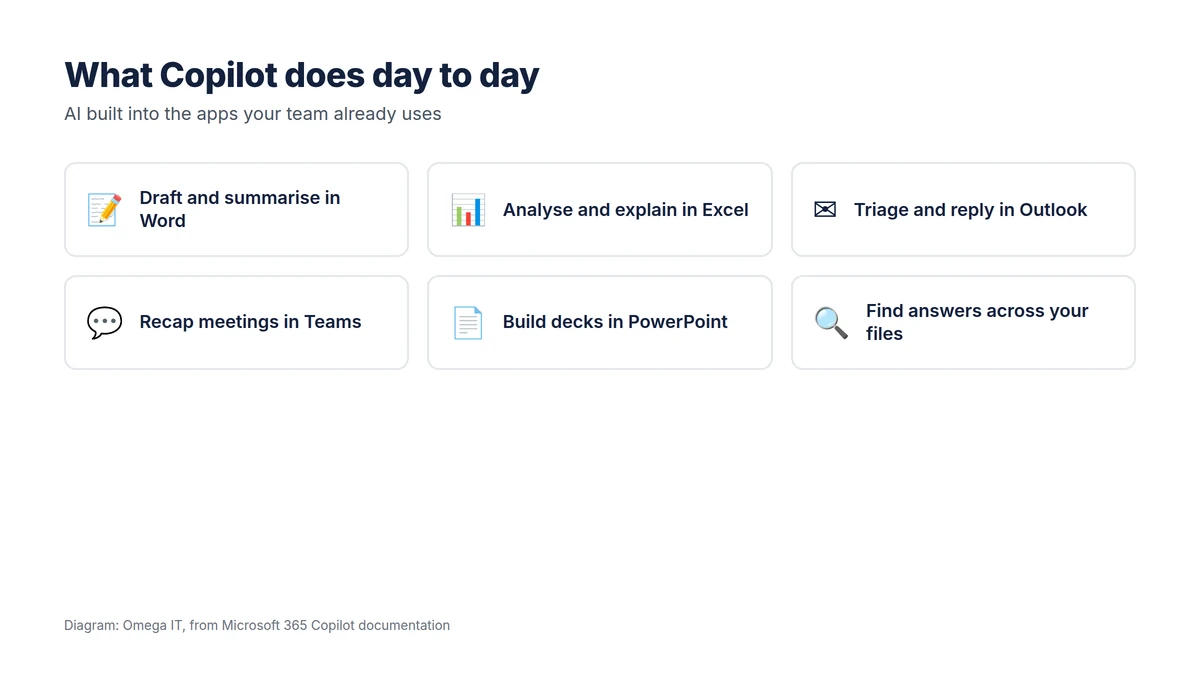
In practice, the everyday wins are things like: drafting a first version of a document or summarising a long one in Word; building formulas, explaining data and spotting trends in Excel; summarising a crowded inbox and drafting replies in Outlook; catching up on a meeting you missed with a Teams recap and action points; turning a document into a first-draft deck in PowerPoint; and asking plain-language questions across your own files. None of it replaces judgement, but it removes a lot of the blank-page and busywork time.
What it costs in the UK
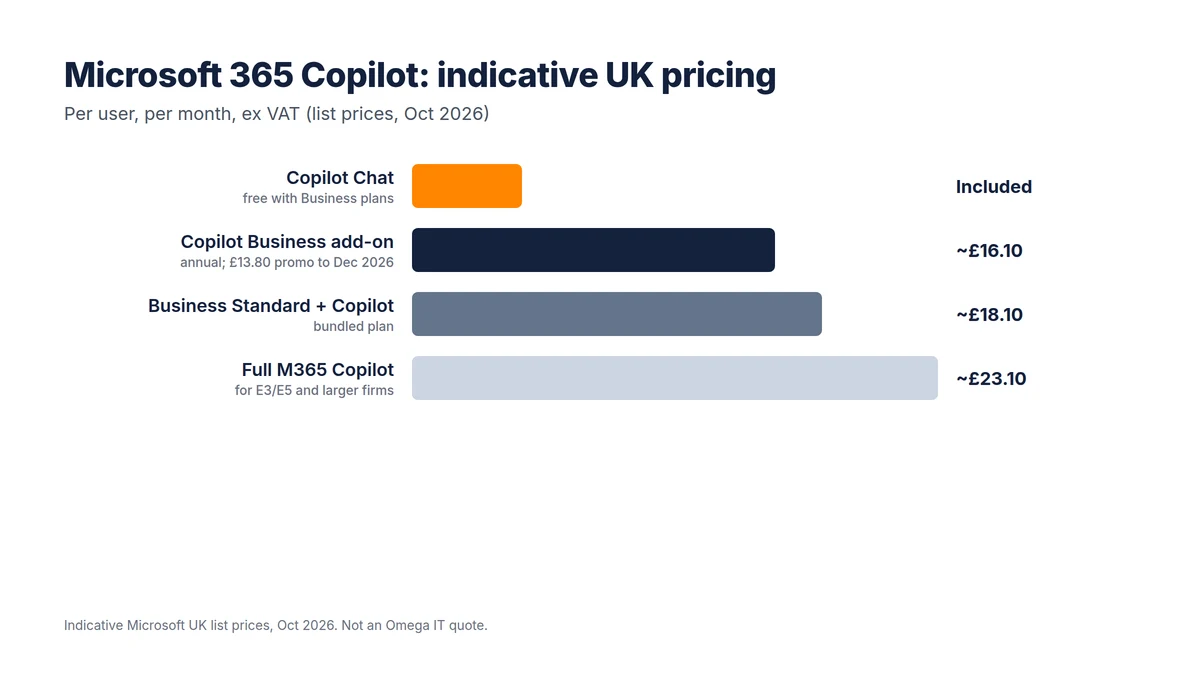
According to Microsoft's UK Copilot pricing, Microsoft 365 Copilot Business is an add-on at about £16.10 per user per month on an annual commitment, with a promotional £13.80 first-year price for subscriptions started between 1 July and 31 December 2026, or about £19.32 on a monthly commitment. It requires an eligible Microsoft 365 Business plan (Basic, Standard or Premium, or Apps for Business), is aimed at organisations under 300 users, and needs no minimum beyond a single seat. The full Microsoft 365 Copilot licence used by larger firms is around £23.10. Copilot Chat is included free with business plans. These are indicative list prices, ex VAT, and change over time.
Run a sensible Copilot pilot
Our team can prepare your data and licensing before you roll Copilot out.
The data questions to ask first
Before switching Copilot on, get two things straight:
- Training: Microsoft states that your prompts, documents and responses are processed within your compliance boundary and are not used to train its foundation models. That is a key difference from pasting company data into a free public AI tool.
- Access: the bigger practical risk is over-broad permissions. Copilot can surface anything a user already has access to, so if your SharePoint and OneDrive sharing is messy, Copilot will make that visible fast. Tidy permissions first; it is the single most important preparation step.
If you are also thinking about a wider move to the cloud, our Microsoft 365 migration guide covers getting the tenant into good shape, and Microsoft 365 backup covers protecting the data Copilot reads.
How to run a sensible pilot
- Pick a handful of people in document-, email- or meeting-heavy roles.
- Give them two or three concrete use cases, for example meeting recaps, email summaries and first-draft proposals.
- Sort out the SharePoint and OneDrive permissions for that group first.
- Run it for 30 to 60 days and ask what genuinely saved time.
- Decide on the evidence: expand, hold, or stop. The monthly option makes a time-boxed pilot easy.
Is it worth it?
For roles that live in Office apps and meetings, and where the underlying data is reasonably organised, Copilot can pay back the licence in time saved. For roles that rarely touch documents, or where data and permissions are a mess, the return is weaker until that groundwork is done. The honest answer is to pilot it and measure, rather than roll it out on faith. Our AI consultancy service helps businesses do exactly that.
Want this set up for you?
Omega IT can configure and manage Microsoft 365 for your team.
Where Copilot struggles, or isn't worth it
Copilot is not magic, and it is not for everyone. It adds least value for roles that rarely touch documents, email or meetings, and it can disappoint where the underlying data is disorganised, because it has little good material to draw on. It can also surface content that was shared too widely, which is a permissions problem rather than a Copilot one. And it still needs a human to check its output: it drafts and summarises well, but it can be confidently wrong, so it speeds up work rather than replacing judgement. For a very small team with tidy but simple needs, the free Copilot Chat may be enough before paying for the add-on.
Measuring the pilot
Treat a pilot as an experiment with numbers, not a vibe. Decide up front what you are trying to improve, for example time spent drafting documents, clearing the inbox, or writing up meetings, and ask participants to note roughly how much time each use case saves. At the end of 30 to 60 days, weigh that against the licence cost per user. A handful of people saving a meaningful slice of their week on repetitive work usually justifies the spend; little measurable change is a signal to hold off, tidy your data, or keep Copilot to the roles where it clearly pays. The month-to-month option makes stopping easy if the numbers do not stack up.
Talk to Omega IT
Omega IT helps UK businesses get their Microsoft 365 tenant ready, run a focused Copilot pilot and measure whether it is worth rolling out, through our AI consultancy and Microsoft 365 services.
Thinking about Copilot? Call 0800 254 5458 or 03333 580 300, or request a quote for a readiness check and pilot.
Sources
- Microsoft: Microsoft Copilot plans and pricing (UK)
- Microsoft Learn: Microsoft 365 data responsibility and backup
General guidance with indicative pricing, accurate to October 2026; Microsoft pricing and features change. Diagrams by Omega IT.