
Windows 10 reached the end of its supported life on 14 October 2025. If your business still runs it, the machines keep switching on, but they no longer receive security updates, and that gap widens every month. This guide explains what end of life actually means, the dates that matter for Extended Security Updates, and the four realistic options for UK businesses.
Still running Windows 10?
Get a free, no-obligation quote to plan your move off unsupported Windows 10.
What "end of support" actually means
According to Microsoft, after 14 October 2025 Windows 10 no longer receives technical support, feature updates or security updates. The operating system still runs, but any new vulnerability discovered in it will never be fixed. Attackers actively look for unpatched, end-of-life systems, which is why running them is a growing risk rather than a fixed one, the same lesson as the older Windows Server 2012 R2 end of life.
There are knock-on effects too. Cyber insurers increasingly ask whether all systems are supported, and Cyber Essentials requires supported, patched software, so unsupported Windows can affect both your cover and your Cyber Essentials certification.
The dates that matter
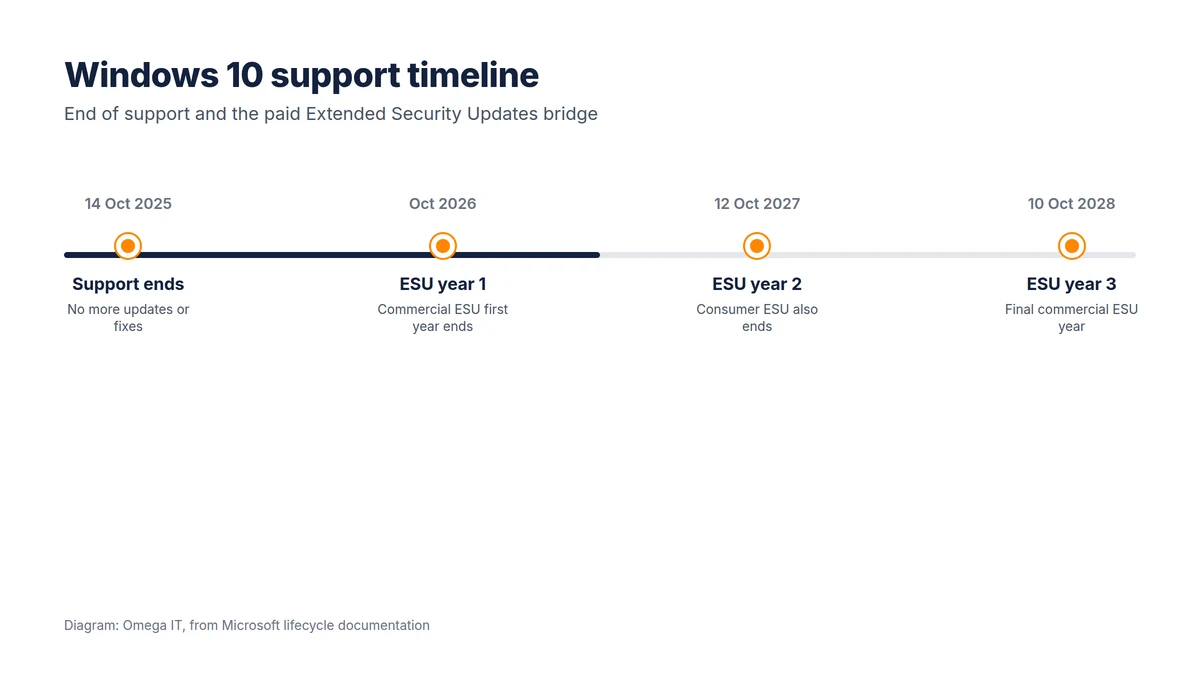
Microsoft offers Extended Security Updates (ESU) as a paid, security-only bridge:
- Consumer ESU runs to 12 October 2027, and can be enrolled free by syncing PC settings, for 1,000 Microsoft Rewards points, or for a one-off fee.
- Commercial (business) ESU is a paid annual subscription available for up to three years, with coverage ending October 2026 (year one), October 2027 (year two) and October 2028 (year three), per Microsoft's lifecycle FAQ.
ESU is explicitly a temporary bridge: it provides only critical and important security patches, no features and no technical support. It buys time to migrate; it is not a long-term answer.
Your four options
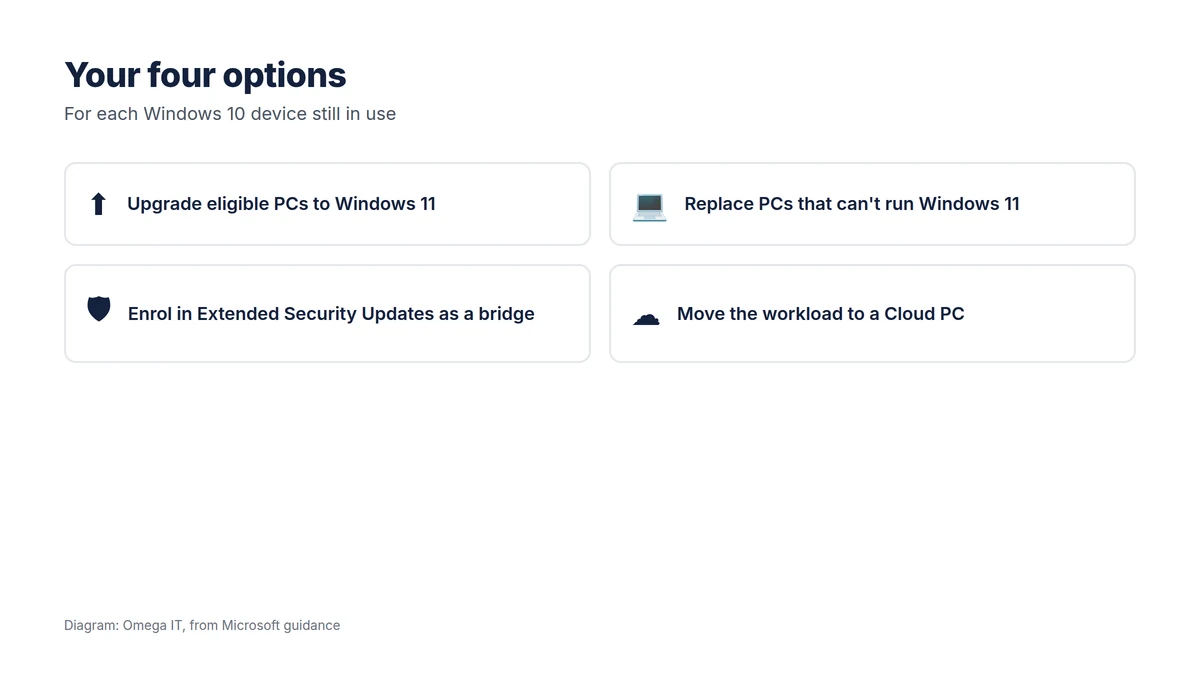
1. Upgrade eligible PCs to Windows 11
Where a PC meets the Windows 11 requirements (including TPM 2.0 and a supported processor), the upgrade is free and is usually the simplest route. The main work is checking eligibility and testing your line-of-business applications on Windows 11 first.
2. Replace PCs that can't run Windows 11
Older machines that fail the hardware checks need replacing. This is an opportunity to standardise on a known, manageable build rather than a mix of ages, and to recycle old devices securely.
3. Enrol in ESU as a short bridge
If you cannot migrate every device in time, commercial ESU keeps the stragglers patched for a defined period while you plan. Treat it as breathing space with a deadline, not a destination, and budget for the migration it is buying time for.
4. Move the workload to a Cloud PC
For some users, a Windows 365 Cloud PC is a neat answer: a supported Windows 11 desktop in the cloud, reached from the existing device, which extends the life of ageing hardware without leaving it running an unsupported OS for daily work.
Plan your Windows 10 exit
Our UK team can scope upgrades or new devices for your business.
How to plan the move
- Inventory every Windows device and record which are eligible for Windows 11 and which are not.
- Test your key applications on Windows 11 before rolling it out widely.
- Group the fleet: upgrade the eligible, replace the unviable, and put ESU only under the few that genuinely need more time.
- Secure the old devices in the meantime, and wipe them properly on disposal.
- Set a deadline so ESU does not quietly become permanent.
Done well, this is also a chance to tidy up management and security across the estate, the kind of work covered in our guide to IT infrastructure management.
What it means for Cyber Essentials and insurance
End of life is not only a technical risk; it has compliance and commercial consequences. Cyber Essentials requires supported, patched software, so machines left on Windows 10 without Extended Security Updates can put your Cyber Essentials certification at risk. Cyber insurers increasingly ask whether all systems are supported, and running end-of-life operating systems can affect cover or a claim. If your business relies on either, unsupported Windows is a liability as well as a security gap.
A realistic migration timeline
For most small businesses, a sensible plan runs over a few weeks rather than a single weekend:
- Inventory and assess every device for Windows 11 eligibility, and flag the ineligible ones.
- Pilot Windows 11 with a small group and your key applications, to catch compatibility issues early.
- Roll out in waves by team or site, upgrading the eligible machines.
- Replace or bridge the rest: new hardware where it is due, Extended Security Updates only for the few that genuinely need more time, and a Cloud PC where it fits.
- Decommission old devices securely, wiping data before disposal or recycling.
Starting now matters: leaving every ineligible machine until the Extended Security Updates run out concentrates cost and risk into one rushed moment.
Want this handled for you?
Omega IT can take the day-to-day IT off your plate.
Don't forget the hidden Windows 10 devices
The desktops and laptops your team uses every day are the obvious part. The machines that catch businesses out are the ones nobody thinks of as "a PC": a point-of-sale or till system, a meeting-room or reception display, a PC bolted to a piece of equipment that runs one old application, a spare laptop in a drawer, or a virtual machine quietly running in the background. Each of these can be a full Windows 10 install exposed to the same risk. A proper inventory should sweep up every device that runs Windows, not just the staff fleet, so none is left unsupported and unnoticed after the deadline.
Talk to Omega IT
Omega IT helps UK businesses inventory their fleet, check Windows 11 eligibility, and plan upgrades, replacements or Cloud PCs with as little disruption as possible, as part of our managed IT support.
Still running Windows 10? Call 0800 254 5458 or 03333 580 300, or request a quote for a migration plan.
Sources
- Microsoft: End of support for Windows 10
- Microsoft: Windows 10 Extended Security Updates
- Microsoft Learn: Extended Security Updates lifecycle FAQ
General guidance, accurate to October 2026; Microsoft lifecycle dates can change. Diagrams by Omega IT.