
"We offer fast, responsive IT support." Every provider says it; the service level agreement, or SLA, is where you find out whether it is true. The SLA is the part of an IT support contract that turns friendly promises into measurable commitments, and it is the single most useful thing to read before you sign. This guide explains what an SLA actually covers, the one distinction that matters most, and how to compare one provider's SLA against another.
This is a focused companion to our wider IT support contract checklist; here we zoom in on the SLA and response times specifically.
Comparing support SLAs?
Get a free, no-obligation quote with support terms set out clearly.
What an SLA actually covers
A good SLA sets out, in writing:
- Support hours — the window during which the targets apply, and what happens outside it.
- Priority levels — how issues are graded by business impact.
- Response and resolution targets — how quickly the provider will react and, ideally, fix each priority.
- How you raise issues — phone, email or portal, and how urgent ones are escalated.
- Consequences — what happens, such as service credits, if targets are missed.
If any of these is missing or vague, that is the gap where a disappointing service hides.
The distinction that matters most: response vs resolution
The most important thing to understand about any SLA is the difference between a response time and a resolution time.
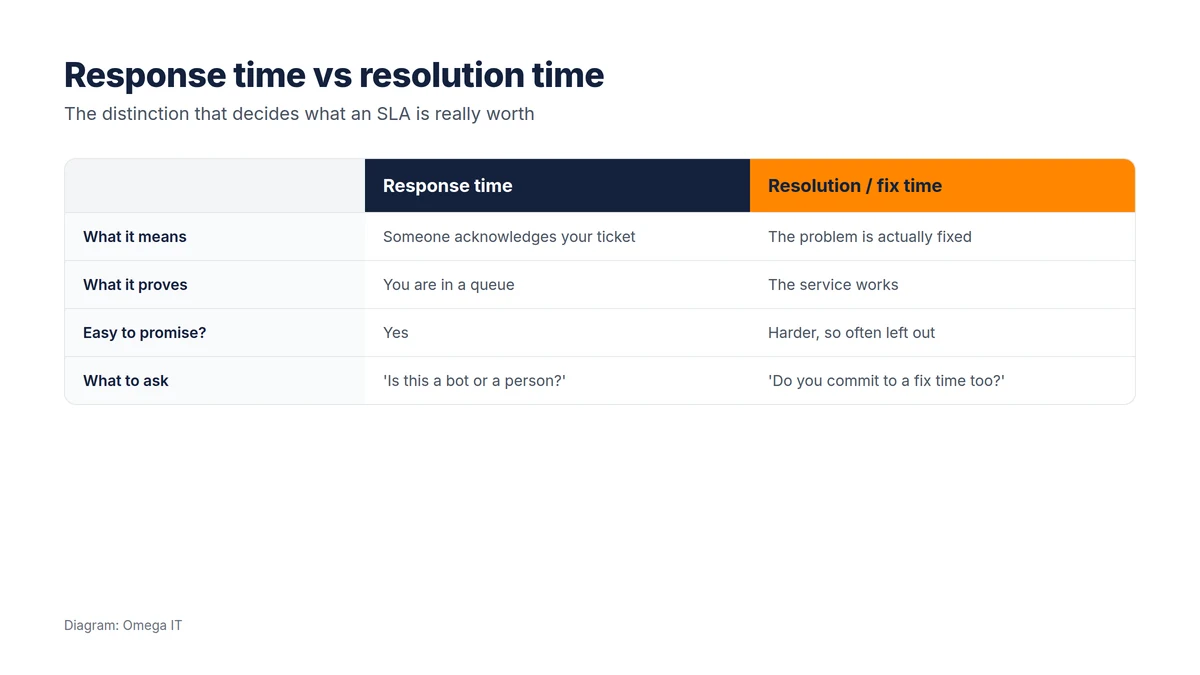
A response time is how long before someone acknowledges your ticket and begins work. A resolution time is how long before the problem is actually fixed. They are very different promises. A provider can proudly advertise a "15-minute response" and still leave your business offline for a day, because an acknowledgement is not a fix.
Response times are easy to promise, and sometimes met by an automated reply. Resolution times are harder, because they depend on the provider actually having the capacity and skill to fix things, which is exactly why many SLAs quietly leave them out. When you compare quotes, ask directly: "Do you commit to resolution or fix times as well as response times, and what are they?" The answer tells you a lot.
Priority levels: not every issue is equal
A sensible SLA grades issues by business impact rather than treating everything the same.
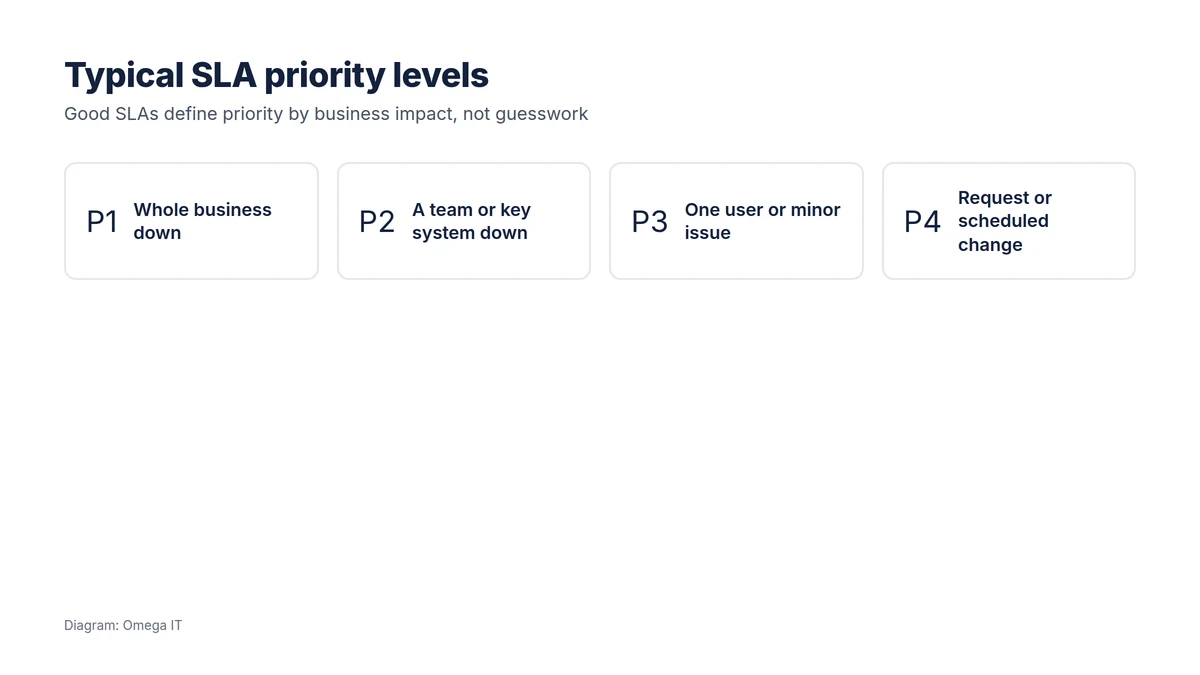
Typically you will see four tiers: a P1 where the whole business is down, a P2 where a team or a key system is affected, a P3 for a single user or a minor problem, and a P4 for a request or a scheduled change. Each priority has its own target times, so a company-wide outage is handled faster than a request for a new monitor. Check two things: that the definitions are clear and sensible, and that you, not only the provider, can reasonably judge which priority an issue falls under.
Know what an SLA covers
Our UK team will explain how our support is structured, in plain English.
Service credits: does the SLA have teeth?
An SLA with no consequence for missing it is just a wish. Service credits, a percentage of the monthly fee returned when targets are missed, are the usual mechanism. They will not cover your actual losses from a bad outage, and they are not the point of the relationship, but they signal that the provider is prepared to stand behind its promises. Ask whether credits apply, how they are triggered, and whether you have to claim them or they are applied automatically.
What "good" looks like
There is no single correct set of numbers; the right targets depend on how much downtime your business can bear and the hours you are paying for. But a healthy SLA usually has these features:
- Clear priority definitions tied to business impact.
- Response and resolution targets, not response alone.
- Targets matched to your hours, with out-of-hours cover spelled out.
- A named escalation path for when something is not moving.
- Consequences, such as service credits, for missed targets.
- Regular reporting, so you can see whether the SLA is actually being met.
That last point matters: an SLA you cannot measure is impossible to hold anyone to. A provider confident in its service will happily report on its own performance.
How to compare SLAs between providers
- Put the SLAs side by side and read the resolution commitments, not just the headline response time.
- Check the priority definitions match how your business actually experiences problems.
- Confirm the support hours, and the cost and availability of out-of-hours cover.
- Look for service credits or another consequence for missed targets.
- Ask how performance is reported to you, and how often.
Two monthly fees that look identical can sit behind very different SLAs. The cheaper quote with a response-only, consequence-free SLA may cost you far more on the day something breaks. When you are weighing providers overall, our guide to choosing an IT support provider and our explainer on how IT support is priced put the SLA in context, and if you are moving on from a provider, see how to switch IT support provider.
Want this handled for you?
Omega IT can take the day-to-day IT off your plate.
The operating model behind a good SLA
An SLA is a promise about outcomes, but the promise is only as good as the way a provider works day to day. When you read one, it is worth understanding what has to sit behind it for the numbers to be real.
- Proactive monitoring and maintenance. The best way to hit response targets is to have fewer incidents in the first place. A provider that monitors your systems, patches on a schedule and catches problems early will breach its SLA far less often than one that only reacts when you call.
- Enough capacity. Fast response times depend on there being people free to respond. Ask how the provider staffs its service desk and what happens at busy times, because an SLA means little if every engineer is already on another ticket.
- A clear escalation path. When a P1 is not moving, you need to know who to call and how quickly it is escalated. A named route beats "we'll chase it".
- Regular service reviews. Good providers review SLA performance with you periodically, so missed targets are discussed and fixed rather than buried.
In other words, the SLA is the visible tip of an operating model. If the provider cannot explain the monitoring, staffing and escalation that make the numbers achievable, treat the headline figures with caution.
SLA myths and gotchas
A few traps catch businesses out when comparing SLAs:
- "99.9% uptime" is not a support SLA. An uptime guarantee is about a system being available; a support SLA is about how fast you get help. They are different promises, and a provider may offer one while staying quiet about the other.
- "Response" dressed up as "resolution". Re-read any target that sounds impressive and check whether it commits to fixing the problem or merely acknowledging it.
- Business-hours definitions. "Business hours" can mean 9 to 5, or 8 to 6, and the boundary matters when something breaks at 5:15pm. Confirm the exact window and the out-of-hours arrangement.
- Unmeasured SLAs. If performance is never reported, the SLA is unenforceable in practice. Insist on reporting.
- The clock-stop small print. Check when the clock pauses (for example "awaiting customer response"), so a target cannot be met on paper while your issue sits unresolved.
Reading these details is not pedantry; it is how you avoid signing up to a promise that sounds strong and delivers little.
Talk to Omega IT
Omega IT sets out support hours, priorities and response commitments in writing, as part of our managed IT support and outsourced IT support for UK businesses.
Want to see a clear SLA? Call 0800 254 5458 or 03333 580 300, or request a quote.
General guidance, accurate to October 2026. Diagrams by Omega IT.