

On the evening of Thursday 12 November 2026, a Microsoft 365 outage left organisations around the world unable to reach their email and, in many cases, their calendars, Teams scheduling and Copilot as well. By the following morning it was still not fixed. For many small businesses it was a sharp lesson in something that rarely makes the risk register: how much of the business now runs on a single supplier.
This guide sets out what is confirmed about the outage, why one platform failing can stop so much at once, and how a managed service provider (MSP) reduces that concentration risk by layering independent third-party tools around a core platform such as Microsoft 365, and by handling the commercial side of using several suppliers. It is not an argument against Microsoft 365, which remains an excellent platform and one Omega IT supports every day. It is an argument against having no plan B.
Too much riding on one platform?
Get a free, no-obligation quote for IT support that adds independent layers around Microsoft 365.
What happened in the Microsoft 365 outage
Problems were widely reported from around 18:00 UK time on Thursday 12 November, according to BBC News and The Register. Microsoft's service health page described a "service degradation" in which users "may be unable to connect to multiple Microsoft 365 services", and Microsoft said the incident affected Microsoft 365 services "that interact with Exchange Online and email services", as The Register reported. What is confirmed so far:
- What went down. Mailbox access and email delivery were at the centre of it. Microsoft's list of affected business services included Exchange Online, Microsoft Teams, SharePoint Online, Microsoft 365 Copilot, Defender, Intune and Power BI, as reported by ABC News, and its consumer notice covered Outlook.com, OneDrive, OneNote and Teams (The Guardian). Teams messaging and meetings largely kept working, but features that rely on Exchange Online, such as calendars and scheduling, did not (Mint).
- How long. More than 12 hours by Friday morning. When this article was written, at around 08:00 UK time on Friday 13 November, Microsoft's status page still showed a service degradation. Check the status page for the current position.
- The cause, so far. Microsoft first described servers failing automated health checks and becoming unavailable (The Register), and said part of its infrastructure was under "elevated load across multiple regions" (ITV News). Restored servers then became unresponsive again when a process "responsible for establishing secure connections" was overwhelmed (ABC News). Microsoft says it will publish the root cause in a post-incident report once the issue is mitigated (The Guardian).
- Not malicious, as far as Microsoft knows. Its updates said: "As of now, we are not aware of any malicious activity that is causing this incident."
- Azure was not listed as affected. The same status page showed "No Azure issues detected at this time".
Microsoft pointed administrators to incident MO1550821 in the Microsoft 365 admin centre for the detailed breakdown (Cyber Security News). Beyond that we will not speculate: the picture may change once Microsoft publishes its review.
Why one outage stopped so much
Most small businesses never decided to put all their eggs in one basket. It happened gradually and for good reasons. Microsoft 365 bundles email, calendars, Teams, OneDrive, SharePoint and sign-in into one subscription, and one platform is simpler to manage than six. The catch is that those services lean on each other. When email failed, so did everything that needed it: meeting invitations, calendar bookings, password-reset links and codes sent by email and, for some firms, the only record of a customer's phone number.
That is concentration risk: one supplier, platform or shared component sitting underneath many of the things you need. It is not unique to Microsoft. A business that runs its email, files, phones, security and backup on any single platform has the same exposure.
Regulators already treat this as a systemic risk
Concentration risk is not just an IT worry. In July 2026 HM Treasury designated Microsoft Ireland Operations Limited, alongside Amazon Web Services, Google Cloud and Oracle, as a Critical Third Party to the UK financial system under the Critical Third Parties (Designation) Regulations 2026. Announcing the start of oversight, the Bank of England said disruption or failure at such providers "could affect multiple firms or markets at the same time", and that firms "remain responsible for managing their own third-party arrangements including due diligence, risk management and contingency planning".
That principle applies well beyond banks. Your cloud provider is responsible for running its service; you are responsible for what your business does when the service isn't running. Microsoft's own shared responsibility model makes the same point about data, which is why our guide to Microsoft 365 backup recommends keeping a copy you control.
Plan for the next outage
Talk to us about independent backup, email security and a fallback for email and phones.
It isn't only Microsoft, and it isn't only outages
Single points of failure come in more than one form, and recent history has a well-documented example of each:
- A platform failure. Microsoft's post-incident review of 29 October 2025 records that Azure Front Door, which routes traffic for many Microsoft and customer services, suffered connection and DNS failures from 15:41 UTC until 00:05 UTC the next day, affecting Microsoft 365 and Entra ID among others. The trigger was an incompatible configuration change that passed health checks before it caused crashes.
- A faulty update from a security vendor. In July 2024 a CrowdStrike software update crashed Windows computers worldwide. Microsoft estimated that 8.5 million Windows devices were affected, less than one per cent of all Windows machines, yet the impact was enormous because so many critical services used the same product.
The second example matters for the argument in this article. Adding third-party tools does not remove risk by itself: a security product installed on every PC is also a dependency. What reduces risk is independence, so that one failure cannot take out several layers at once, and that takes deliberate design.
What independent layers look like in practice
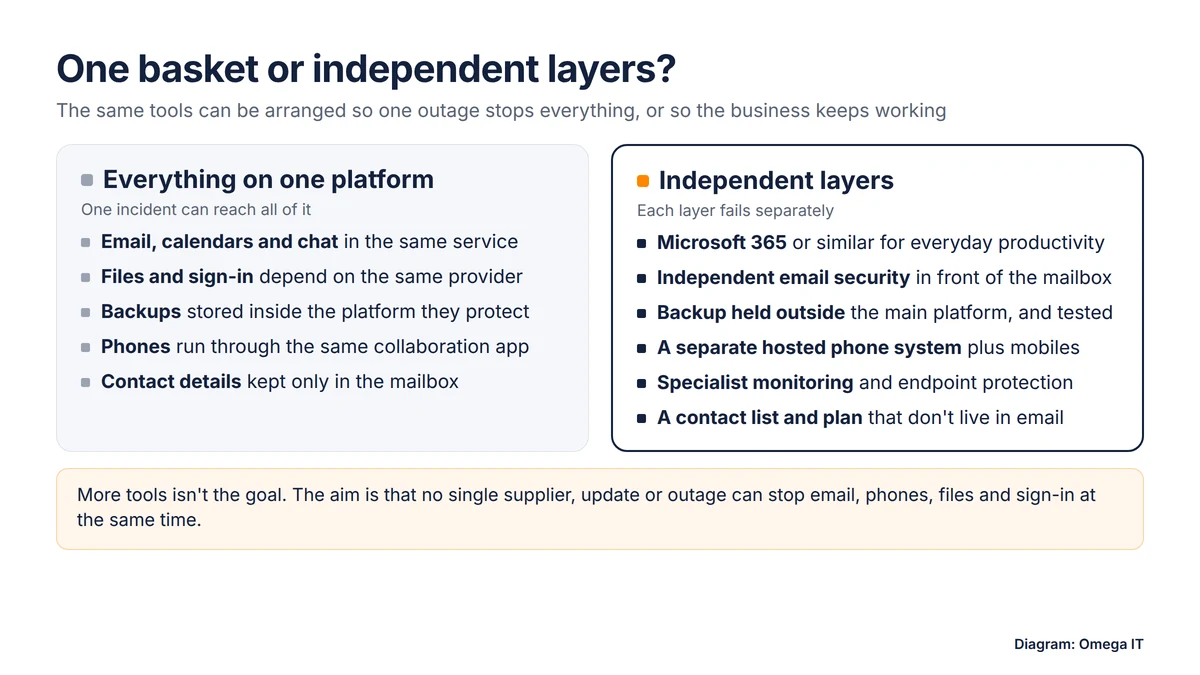
The aim is not to abandon Microsoft 365. It is to make sure no single supplier, update or outage can stop email, phones, files and sign-in at the same time. For a typical small business that means:
- Independent email security. A specialist filtering service in front of your mailboxes stops phishing and malware before it reaches Microsoft 365, and some services can also hold mail or offer an emergency inbox during a disruption. Ask what yours does when the mailbox behind it is unavailable. Our guide to phishing and invoice fraud explains why this layer matters on a normal day too.
- Backup held outside the platform. A third-party backup of email, OneDrive, SharePoint and Teams data, stored separately from Microsoft's own service, protects against deletion, ransomware and mistakes. Many backup services also let you search for and export a file or email you urgently need. It will not bring a mailbox back online during an outage, but it can stop a missing document turning into a lost day. Our guide to disaster recovery and business continuity shows where backup fits.
- Phones that don't depend on email. If your phones run through the same platform as your email, one outage can take both. A separate hosted phone system, with calls that can divert to mobiles, keeps the business reachable. Our comparison of Teams Phone and hosted VoIP covers the trade-offs.
- Specialist monitoring and endpoint protection. Managed detection and response from a specialist watches devices and accounts independently of the platform it protects; see SIEM and MDR explained.
- Control of your own domain. Keep your domain name and DNS with a registrar you control, with correct SPF, DKIM and DMARC records, so you can repoint services if you ever need to.
- A plan that doesn't live in email. A printed or offline contact list for staff, key customers and suppliers, and a short note of who decides what when systems fail.
How an MSP builds a multi-vendor stack without the chaos
Running several specialist tools is harder than running one. Each has its own console, licensing, update schedule and support desk, and they have to work together. That is where a managed service provider earns its keep. A good MSP:
- chooses tools that cover different layers and don't share the same weak point;
- integrates them, so accounts, alerts and policies line up across platforms;
- applies vendors' updates and changes on your behalf, in stages rather than everywhere at once where it can;
- keeps documentation and admin access in order, including emergency "break glass" admin accounts for the core platform;
- tests that backups restore and that the continuity plan works.
Because an MSP supports many businesses, it also tends to spot a supplier problem quickly and can deal with it while your staff carry on with their work.
Want this handled for you?
Omega IT can take the day-to-day IT off your plate.
The commercial side: licences, contracts and one point of contact
The other reason firms drift into one basket is commercial. One subscription, one bill and one renewal date are easy. Several suppliers mean several contracts, minimum terms, renewal dates and price changes to track. An MSP can take most of that off your hands:
- buying and managing licences across vendors, and adding or removing them as people join and leave, so you are not paying for unused seats;
- keeping the number of bills and contacts manageable, with one partner accountable for how the pieces fit together;
- tracking renewal dates and terms, and reviewing whether each tool still earns its place;
- making sure contracts include sensible exit terms, so you can change a supplier without losing your data.
Our IT support contract checklist lists the clauses worth checking, including how your provider manages third-party suppliers.
Doesn't using more suppliers mean more risk?
It can. Every supplier is a possible point of failure, a possible security weakness and another contract to manage, and the CrowdStrike incident showed how a single trusted tool can cause harm at scale. Spreading your IT across suppliers only helps if it is done deliberately: layers chosen so they fail independently, changes rolled out carefully, and suppliers checked for their own security and resilience.
Your MSP is a dependency too. Ask how it would keep supporting you if one of its own tools failed, and how it protects the access it holds to your systems. In the UK, the Cyber Security and Resilience Bill would bring medium and large managed service providers under regulation for the first time, which shows how seriously this kind of supplier risk is now taken.
A continuity plan for email and phones
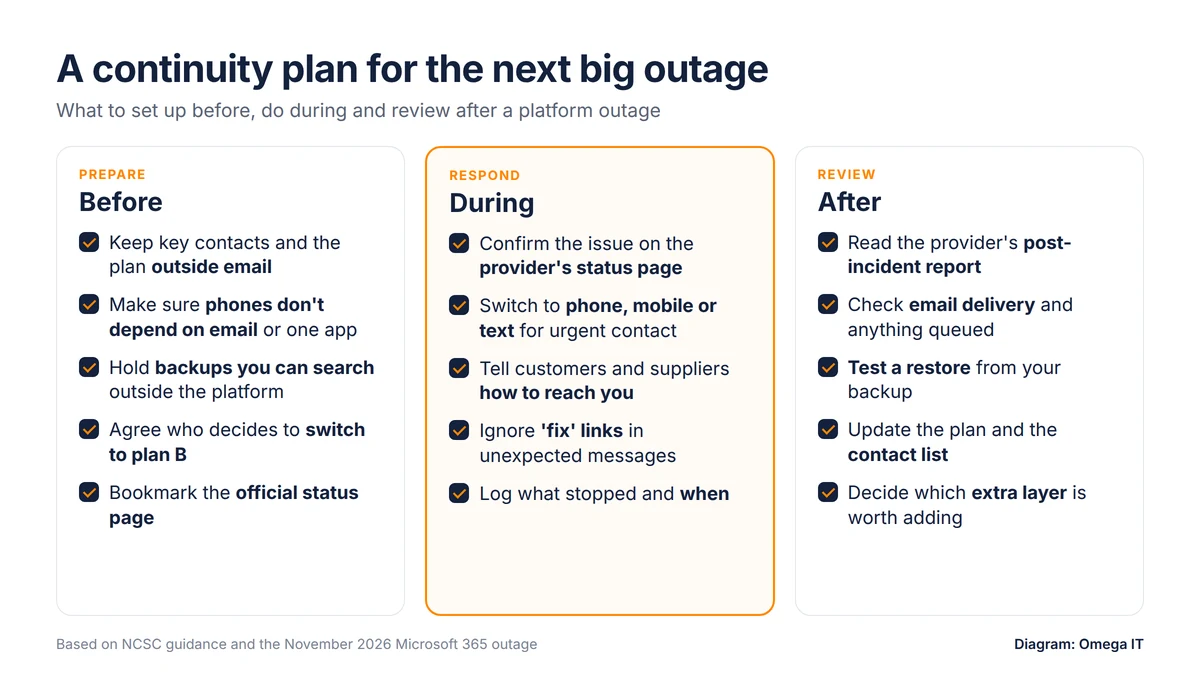
You do not need a thick binder. A one-page plan that everyone knows about covers most of what matters:
- Before: keep contacts and the plan outside email; make sure your phones don't depend on email; hold backups you can search outside the platform; agree who decides to switch to plan B; bookmark the provider's official status page.
- During: confirm the problem on the status page rather than resetting passwords or rebuilding PCs; switch to phone, mobile or text for urgent contact; tell customers and suppliers how to reach you; ignore messages offering a "fix", which criminals use to exploit outages, as one Australian state government warned during this one (The Guardian); note what stopped and when.
- After: read the provider's post-incident report; check that queued email has arrived; test a restore; update the plan and decide which extra layer would have helped most.
The NCSC's guidance on backing up your data is a good starting point for the backup element.
Questions to ask your IT provider this week
- Which of our critical services depend on a single supplier, and what happens if it goes down?
- Is our backup held outside Microsoft 365, and when did we last test a restore?
- Would our phones keep working if email and Teams were unavailable?
- Who holds admin access to our tenant, domain and DNS, and is there an emergency admin account?
- How would you tell us about an outage, and how would we tell our customers?
If your provider struggles with these, our guides to choosing an IT support provider and managed IT support vs break-fix may help.
How Omega IT can help
Omega IT supports UK businesses that run on Microsoft 365 and can help you add independent layers around it. Our cyber security services include Proofpoint email protection alongside MDR and SIEM monitoring, our Hypercloud hosted phone system gives you business phones that don't run through your email platform, and our managed IT support takes the day-to-day IT off your plate. Omega IT is Cyber Essentials Plus certified (2026). Request a free, no-obligation IT support quote.
Sources
- Microsoft: Microsoft 365 service health status (checked 13 November 2026, about 08:00 UK time)
- BBC News: Microsoft outage live coverage (12–13 November 2026)
- The Register: Microsoft's massive M365 outage stretches past 12 hours as its fixes keep failing (13 November 2026)
- The Guardian: Microsoft struggles to fix huge outage affecting Outlook and Teams and live updates (13 November 2026)
- ITV News: Microsoft confirms outage as thousands of users report connectivity issues (12 November 2026)
- ABC News: How the global Microsoft Outlook outage affects Australians (13 November 2026)
- Mint: Microsoft outage crosses 12 hours: what's working and what's down (13 November 2026)
- Cyber Security News: Massive Microsoft 365 outage (13 November 2026)
- Microsoft Azure: Post Incident Review: Azure Front Door, 29 October 2025
- Microsoft: Helping our customers through the CrowdStrike outage (20 July 2024)
- Bank of England: UK financial regulators to begin overseeing Critical Third Parties (July 2026)
- legislation.gov.uk: The Critical Third Parties (Designation) Regulations 2026
- Microsoft Learn: Shared responsibility in the cloud
- NCSC: Backing up your data
- GOV.UK: Cyber Security and Resilience Bill factsheet: relevant managed service providers
General guidance, written on 13 November 2026 while the Microsoft 365 outage was still being resolved. Details may change when Microsoft publishes its post-incident report. Featured image is an illustration; diagrams by Omega IT.